What to Actually Give Your Accountant as a Freelancer
Table of Contents
In short: A US freelancer should give their accountant expense totals already sorted into Schedule C categories, the receipt behind each expense, every 1099-NEC and 1099-K plus a record of income that came without a form, the prior-year return, and the dates and amounts of any quarterly estimated payments. Send it in February, not on April 14, ideally as both a PDF and a spreadsheet.
There's a specific kind of dread that shows up a few weeks before you're due to meet your accountant: a folder of screenshots, a stack of paper receipts, a vague sense that you spent money on business things throughout the year without ever writing any of it down. You're not alone: this is the single biggest reason freelancer tax prep costs more and takes longer than it needs to. Your finances probably aren't that complicated; what you're handing over just isn't what your accountant actually needs.
Disclaimer: This article provides general information only and does not constitute tax advice. Consult a tax professional, such as a CPA or enrolled agent, about your circumstances.
What Tax Pros Actually Want (vs. What They Get)
Most freelancers hand their accountant a mix of bank statements, a shoebox or camera roll of receipts, and whatever 1099s showed up in the mail or inbox. What accountants actually want is far more specific: totals that are already sorted, evidence that backs each one up, and a clear picture of every dollar that came in. The gap between those two things is exactly where your accounting bill goes up: every hour they spend sorting and categorizing on your behalf is an hour billed at their rate instead of yours.
Categorized Expense Totals That Match Schedule C Lines
Rather than a pile of receipts, the most useful thing you can hand over is a report that's already grouped the way Schedule C expects: advertising, car and truck, supplies, office expense, and so on. When your accountant can see "$X in supplies, $Y in software, $Z in vehicle expenses" instead of a chronological list of hundreds of transactions, they're reviewing your work instead of doing it from scratch. That's the entire difference between an hour of data entry and ten minutes of review.
Receipt Evidence Attached to Each Expense, Not "Somewhere in My Email"
Totals alone aren't quite enough. Your accountant (and, if it ever comes to it, the IRS) needs to be able to trace a category total back to actual evidence. "Somewhere in my email" or "I think that's on my card statement" means your accountant has to go looking, which is the opposite of what you're paying them for. Receipts attached directly to each expense, or at minimum organized and easy to hand over as a batch, remove that entire step. See our guide on what receipts the IRS actually requires for what "adequate" documentation looks like in the first place.
An Income Summary, Including Every 1099
Your accountant needs a full picture of what you earned, not just what showed up on official forms. Gather every 1099-NEC you received from clients, along with any 1099-K you got from a payment platform or marketplace. Note that the 1099-K threshold now sits at $20,000 and 200 transactions in a year, so plenty of freelancers with real taxable income won't get one at all. Your accountant still needs to know about that income even without a form attached to it, which means your own records matter as much as the forms you receive, not just as a backup.
Prior-Year Return and Estimated Payments Made
If you have a prior-year return, bring it. Even a simple W-2-only return gives useful context, and if last year was also a freelance year, it's the fastest way for your accountant to spot anything that changed. Just as important: a record of any quarterly estimated payments you already made during the year, with dates and amounts. Without this, your accountant is starting from zero on figuring out what you still owe versus what's already been paid, and that's an easy thing for you to hand over in thirty seconds that would otherwise take them real time to reconstruct from IRS transcripts.
The Export Format That Turns Data Entry Into an Hour of Review
The practical goal is a single export that covers everything above: categorized totals, a way to trace each one back to its receipt, and a clean date range, in a format your accountant can actually use. A PDF is good for a quick read-through. A spreadsheet is better if your accountant wants to import it, filter it, or run their own numbers against it. The best approach is to hand over both (a clean summary to review, plus a working file to manipulate) so your accountant never has to ask you to reformat anything or track down a missing month.
When to Send It: February, Not April 14
Timing matters almost as much as the content. Sending a complete, organized export in February gives your accountant room to actually review it, ask questions if something looks off, and flag anything you might want to adjust before the deadline crunch. Sending it on April 14 means you get whatever attention is left over during the busiest week of their year: rushed, reactive, and far more likely to miss something that would have saved you money with a closer look. If your records are already organized year-round, sending them early costs you nothing extra; it's just a matter of exporting when you're ready instead of waiting until you're forced to. Our guide to preparing for US tax season as a freelancer lays out the months before the deadline, and if April is already close, our last-minute US tax filing tips cover what to do first.
How Taxr Fits
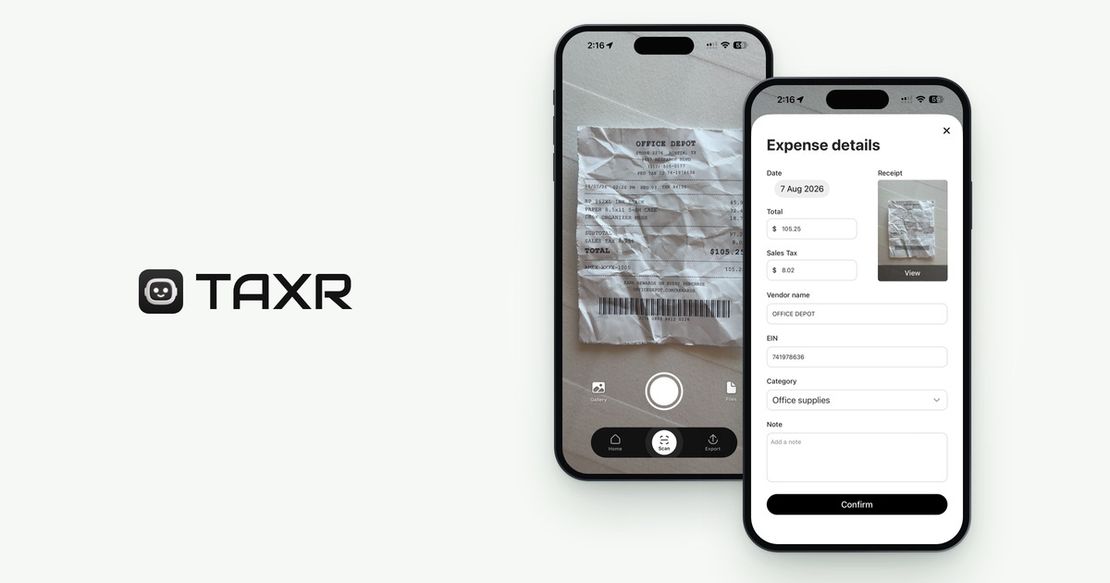
Taxr is built to make this handoff quick. Every receipt you scan throughout the year gets a category (the AI suggests one and you confirm it) and is stored with its image, so by the time you're ready to send something to your accountant, the organizing work is already done: you're exporting a finished record, not building one under deadline pressure. Export an Excel or PDF report for any date range and email it to yourself or straight to your accountant. The PDF has a summary by category and a table of receipt details; the Excel file adds a View link to each receipt image (the links expire 48 hours after export). Either way, you hand over a report that turns their hour of data entry into minutes of review.
For a broader look at how receipt-tracking tools compare on exactly this kind of handoff, see our roundup of the best receipt scanner apps in 2026, and if you're setting up your very first year of freelance recordkeeping, our first-year freelancer tax checklist walks through the whole timeline.
Make Your Accountant's Job (and Your Bill) Smaller
The freelancers who pay the least for tax prep are rarely the ones with the simplest finances. They're the ones who show up with organized records instead of raw material. Every bit of sorting you do before the meeting is time your accountant doesn't have to bill you for.
Download Taxr and turn your next accountant meeting into your easiest one yet.