What Actually Goes in an MTD Quarterly Update
Table of Contents
In short: An HMRC Making Tax Digital quarterly update contains only a total for each income and expense category, aligned to the Self Assessment return categories, not individual receipts or invoices. Each update is cumulative from 6 April, nil updates are still required, and you keep the underlying records for at least five years after the 31 January deadline for that tax year.
A lot of sole traders picture Making Tax Digital as uploading a folder of receipts to HMRC every three months: every coffee, every fuel stop, every invoice, scanned and sent off for inspection. That's not what a quarterly update is, and the actual answer is a lot less invasive than most people assume.
Disclaimer: This article provides general information only and does not constitute tax advice. Consult a qualified accountant or tax adviser about your circumstances.
Category totals, not individual receipts or invoices
Here's the reassurance worth leading with: HMRC does not receive your individual receipts or invoices through a quarterly update, only totals per income and expense category. If you spent £412.50 on travel across the period, HMRC sees one line: travel, £412.50. It doesn't see the train ticket, the taxi receipt, or the fuel stop that added up to that figure. Those stay in your own records, not HMRC's.
This is a genuinely different model from what "digital tax" sounds like it might mean. You're submitting a summary rather than evidence for HMRC to review line by line, the same way the self-employment pages of a Self Assessment return have always asked for totals rather than a shoebox of paperwork.
The categories you're actually reporting
The totals you submit are aligned to the same broad categories used on a Self Assessment return, covering both income and expenses: things like turnover or fees received, cost of goods or materials, staff costs, car, van and travel expenses, rent, rates and utilities for business premises, repairs and maintenance, professional and legal fees, office costs, and other allowable expenses. If you've filed a Self Assessment return before, none of this will look unfamiliar. It's the same shape of information, just reported four times a year instead of once.
Nil updates count too
If a period passes with no income and no expenses at all, you still need to submit an update, with every category simply showing zero. There's no minimum activity level that exempts you from submitting; silence isn't treated as "nothing to report." See MTD quarterly update deadlines for the full 2026-27 calendar, including how the deadlines apply to nil updates the same way.
Where the totals come from: your digital records
The total in each category has to be backed by actual digital records, not a year-end estimate. HMRC's underlying rule is that your primary records are digital from the point you enter them, and connected by digital links through to whatever submits your update; you can't manually retype a figure from one system into another and call the chain digital. That said, "digital" is a lower bar than it sounds: a dedicated records app paired with separate filing software counts, and even a properly-linked spreadsheet still qualifies as your records layer. What happens every quarter, mechanically, is that whatever tool you use simply sums up everything you've entered under each category since 6 April. The update is that sum.
Why clean categorisation during the year is the whole game
Because the update is just a sum, the entire difficulty (or ease) of quarterly reporting comes down to whether your records were categorised correctly as you went. If every receipt was filed under the right category the moment it happened, quarter-end is arithmetic your software has already done. If categorisation got skipped and everything's sitting in a generic "expenses" pile or a physical shoebox, quarter-end turns into a reconstruction project: sorting three months of paperwork into categories under deadline pressure, guessing at the ones you can barely read anymore.
This is really the only part of MTD that's genuinely new work. The totals themselves are familiar; doing the categorisation continuously, rather than once a year, is the actual behaviour change.
Errors don't need a formal correction
One more reassurance: because updates are cumulative (each one covers 6 April through to the end of the current period, not just its own slice), a mistake caught after one quarter's update is absorbed into the next quarter's recalculated total rather than requiring a separate amendment. Fix the underlying record, and the correction flows through automatically next time. If a deadline slips by entirely rather than just a figure being wrong, see what actually happens when you miss an MTD quarterly update.
Do you ever have to show the actual receipts?
Not sending your receipts to HMRC isn't the same as never needing them again. Quarterly updates only carry totals, but you're still required to keep the underlying records (the receipts, invoices, and digital entries behind each category) for at least five years after the 31 January deadline for the relevant tax year. If HMRC ever opens an enquiry into your return, that's when the individual records matter: you'll need to produce them then, even though they were never part of the quarterly submission itself. In practice, the totals you send HMRC and the receipts you keep serve two different purposes: one is a running summary, the other is your evidence if anyone ever asks.
Where Taxr fits
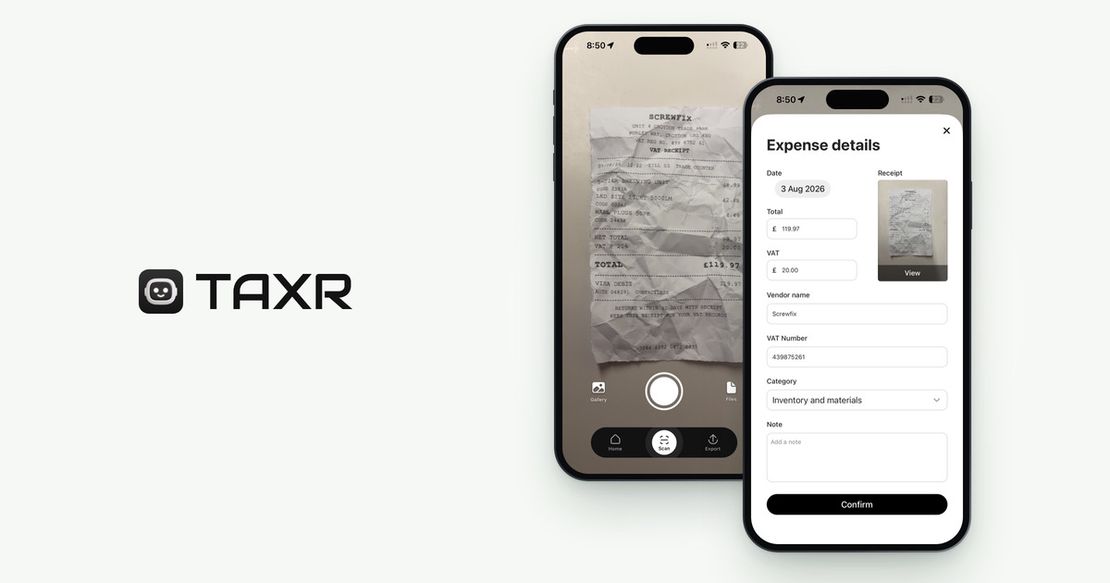
Taxr isn't MTD filing software and doesn't submit anything to HMRC. For that you'll still need HMRC-recognised software or an accountant, and MTD software vs receipt apps covers how the two layers divide up the work. What Taxr does is the categorisation step itself: photograph a receipt and the AI reads the vendor, date, total and VAT, then suggests a tax-aligned category for you to confirm, as it happens. By the time a quarterly deadline arrives, your expenses are already sorted by category, because each category was assigned in the moment, not reconstructed three months later. And because Taxr keeps scanned receipts in the cloud for as long as your account is open, you can meet the five-year retention requirement above without a shoebox in sight.
Download Taxr free and file each receipt the day it happens.