What Digital Records Do You Actually Need for Making Tax Digital?
Table of Contents
In short: Under HMRC's Making Tax Digital for Income Tax, you need a digital record of every business transaction showing at least the date, the amount and a Self Assessment-aligned category. HMRC never receives your receipts, only quarterly category totals, but you keep the receipts as evidence. A spreadsheet still counts if it is digitally linked to your filing software.
Ask most self-employed people what Making Tax Digital actually involves, and you'll usually hear: "I'll have to upload every receipt to HMRC." It's an understandable guess, since the name alone sounds like scanning a shoebox of petrol receipts straight into a government portal. It doesn't work that way. What MTD for Income Tax actually requires is that you keep digital records of your income and expenses, and use them to send HMRC a running total each quarter. The receipts themselves stay with you. Knowing what counts as a digital record, and what doesn't, is the difference between MTD feeling like an audit and feeling like slightly more organised bookkeeping.
Disclaimer: This article provides general information only and does not constitute tax advice. Consult a qualified accountant or tax adviser about your circumstances.
What "Digital Records" Actually Means Under MTD
Making Tax Digital for Income Tax turns the once-a-year Self Assessment routine into four quarterly updates plus an end-of-year tax return, all sent through compatible software (our pillar guide to Making Tax Digital for the self-employed covers the full rollout and who's in scope). What feeds those updates is a digital record of every transaction in your business.
"Digital record" is narrower than most people assume. It isn't a photo sitting in your camera roll, and it isn't a shoebox photographed once a year. HMRC's requirement is that each transaction is recorded digitally with, at minimum:
- The date
- The amount
- The category it falls into, aligned to the same categories used on a Self Assessment return, such as office costs, travel and professional fees
It's also good practice to note the customer or source for income, and the supplier or vendor for expenses. Individually these are just line items. Added up within a category over a quarter, they become the totals in your quarterly update. See what actually goes into a quarterly update for how that rollup works.
The Reassuring Part: HMRC Never Sees Your Individual Receipts
Here's what surprises most people once they look into it: HMRC does not receive your individual receipts or invoices at any point in MTD for Income Tax. What gets submitted each quarter is a set of totals: how much you earned and spent within each category, added together. HMRC sees "travel: £X" and "equipment: £Y" for the quarter, not the coffee receipt from a client meeting or the invoice for a new laptop.
The transaction-level detail lives in your record-keeping software or spreadsheet (more on that below); only the category totals travel to HMRC.
Updates are also cumulative. Each one covers everything from 6 April to the end of that period, not just the months since your last submission. So if you spot an error in an earlier quarter's figures, you correct it in the next update rather than filing a formal amendment. Updates are mandatory even in a quiet quarter (a "nil" update still has to go in), and penalties apply under HMRC's points-based system for missed ones. HMRC isn't applying points for late quarterly updates in the 2026-27 tax year, but they apply after that. It's all covered in MTD penalty points explained.
So Why Do Receipts Still Matter?
If HMRC only sees totals, why keep the receipts at all? Because the totals have to come from somewhere reliable.
They're your evidence. A category total is only as good as the transactions behind it. HMRC can open an enquiry after you file, same as under the old Self Assessment system, and you need to show where each figure came from.
They protect accuracy. Reconstructing three months of expenses from memory, or from receipts that faded in a glovebox, is how figures go wrong. Capturing each receipt at the point of purchase, while the details are still obvious, means the number that reaches your quarterly update is right the first time.
HMRC can ask to see them. Your quarterly updates only ever carry totals, but the underlying records are what you produce if asked. Gov.uk's guidance on Making Tax Digital for Income Tax sets out what HMRC expects you to keep. Digitising records as you go, rather than reconstructing them after the fact, is what MTD's digital-by-default approach is really asking of you, even though the word "receipt" never appears in the quarterly update itself.
Do Spreadsheets Still Count?
Yes, with one condition. HMRC's rules don't force everyone onto a single dedicated app. They explicitly support a two-layer model: record-keeping software (which can include a spreadsheet) paired with separate filing or bridging software that transmits your figures to HMRC, provided the two are connected by a digital link.
The condition is that link. A spreadsheet where you log each transaction is a legitimate digital record. What isn't allowed is manually re-typing those figures into a second piece of software before they're submitted, because that breaks the digital trail MTD is built around. Instead, the data needs to reach your filing software without retyping: through an add-in, a non-manual export and import, or dedicated bridging software.
For a closer look at how record-keeping apps and full MTD filing software differ, see MTD software vs receipt apps.
Where a Receipt-Scanning App Fits
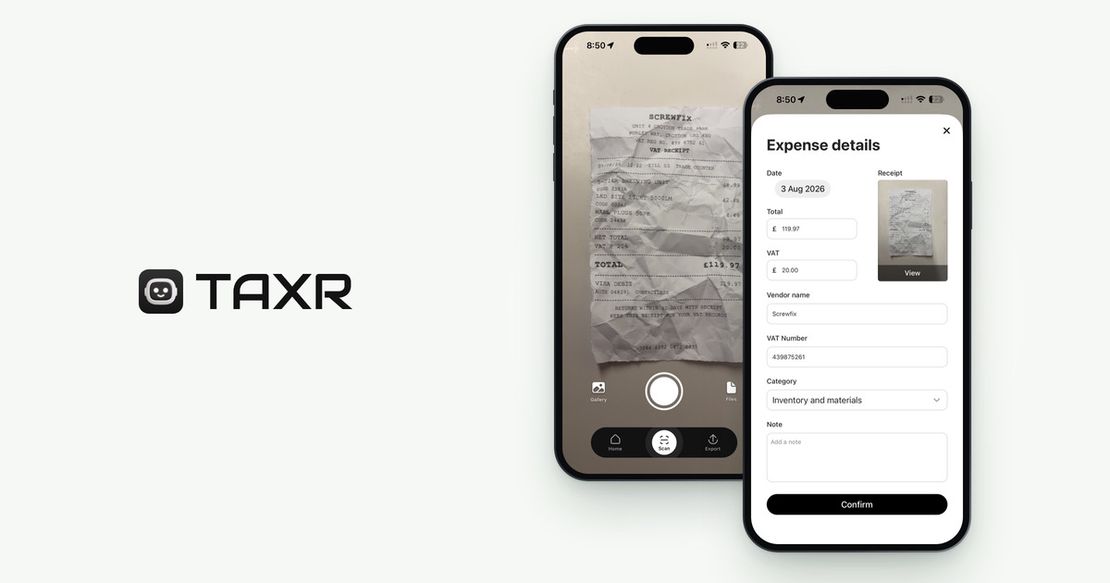
This is exactly the gap a receipt-scanning app is built for: the records layer, not the filing layer. To be direct about what Taxr is and isn't: Taxr is not MTD software, and it doesn't file anything with HMRC. What it produces is per-transaction expense records you can export as Excel or PDF for your accountant, turning "a digital record for every transaction" into something that takes seconds instead of an evening of admin.
Photograph a receipt on iOS or Android and Taxr's AI reads the vendor, date, total, and VAT for you, so there's no manual typing. Each scan becomes a per-transaction digital record with a tax-aligned category (suggested by the AI and confirmed by you), which is the same shape of data your quarterly totals are built from.
A records app paired with filing software is a set-up HMRC's own guidance describes, as long as the two are digitally linked. Taxr exports your records as an Excel file, but whether your MTD-recognised filing or bridging software can import that file is something to check with the software provider before you rely on it. Importing a file counts as a digital link; retyping the totals by hand, or copying them from a PDF, doesn't. If you'd rather have an accountant handle filing, send them the export instead. See do you need an accountant for MTD if you're weighing that up. Taxr also runs a free portal for accountants at portal.taxr.io, where your accountant can see the same records once your accounts are linked.
What to Capture for Every Transaction
Boiled down to a checklist, here's what belongs in a digital record for each transaction:
| Field | Expenses | Income |
|---|---|---|
| Date | Date of purchase | Date received |
| Amount | Total paid (VAT noted separately if you're VAT-registered) | Total received |
| Category | Self Assessment-aligned category, such as office costs, travel or professional fees | Source category |
| Who | Supplier or vendor | Customer or source |
None of this is exotic. It's the same information that's always belonged on a receipt or invoice. What MTD changes is that it needs to exist digitally, per transaction, as you go, not reconstructed once a year from a bag of paper. If this is your first year in scope, our first-year MTD record-keeping checklist walks through setting up a clean system before your first deadline.
Make Digital Records a Habit, Not a Scramble
Everything above comes down to one habit: capture each transaction digitally, as it happens, with a date, an amount, and a category. Do that consistently, and your quarterly updates, plus your evidence if HMRC ever asks questions, take care of themselves.
Scanning a receipt the moment you get it is the easiest version of that habit to build. Taxr turns each photo into a categorised, VAT-aware digital record in seconds, ready to export as Excel or PDF for you or your accountant.