The Unit Economics of a $2.99/Month AI Receipt Scanner
- Taxr Team
- Business finance
- Updated
Table of Contents
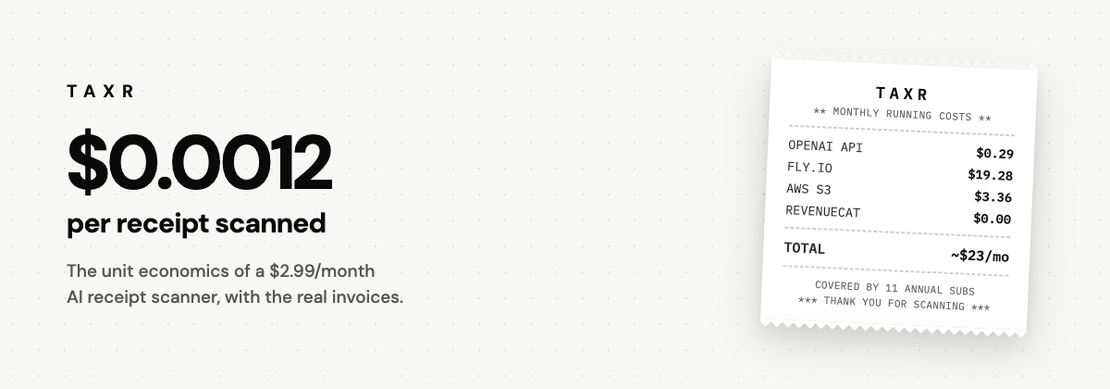
In short: Each Taxr receipt scan costs about $0.0012 in AI inference, a tenth of a cent, and the whole product runs on about $23 a month for inference, hosting and storage. After the 15% store commission, an annual App Store subscriber is worth about $25.49 a year, so eleven annual subscriptions cover the running costs, though development time is the real investment.
Taxr is a receipt scanner. Photo or PDF in, structured expense out: vendor, date, total, tax, category. The incumbents in this category charge far more: Dext's Business plan, for one, is US$302.50 a year. Taxr charges US$2.99/month or US$29.99/year on the App Store (US$31.99/year on Google Play), and every subscriber is cheap to serve, which is different from the business being profitable. More on that below. This post is the arithmetic, because when we tell people the price, the first response is usually "how?", and the second is "subscription for a camera app, seriously?". The answer to both is the same small spreadsheet.
Disclaimer: This article provides general information only and does not constitute tax advice. Consult a qualified tax professional about your circumstances.
What a scan actually costs
Extraction runs on gpt-4.1-mini. A receipt photo plus prompt averages around 3,000 tokens in. Across a full month of real traffic, blended and with retries included, that works out to about $0.0012 per scan, a tenth of a cent.
There is exactly one model call per receipt. No pre-pass, no second call to categorize; the same response returns the extracted fields and the category.
That makes the per-user maths boring. The median person scanning in a given month does 5 receipts, under a cent of inference. The 95th percentile does about 38 (4.6¢). Our heaviest user last month did 166 (20¢, still 7% of their $2.99). Which is also why the paid plan has no monthly scan cap: at these prices a cap would be a pricing tier dressed up as cost control.
The rest of the stack
Django and Postgres on three shared-CPU Fly.io machines in Sydney. Last invoice: $19.28. Receipt images live on S3, $3.36/month. RevenueCat handles subscription state, free at our size.
Store commission is the biggest line item by far. Apple and Google both take 15% rather than the 30% people assume. The reduced tier exists precisely for small developers, and it applies under $1M a year. Worth knowing that Google applies it automatically while Apple's Small Business Program is opt-in: it's a form you have to find and fill in, and it's easy to leave money on the table without realising. If you ship an iOS app and have never checked, go and look right now.
Net of the store cut, an annual App Store subscriber is worth about $25.49/year against pennies of marginal cost.
Two questions this usually raises, answered directly. Yes, receipt images go to OpenAI's API for extraction. API data isn't used for training under their terms, images are stored encrypted on S3, and deleting your account deletes your data (deletion policy). And yes, at the center of the product there's one model call. "GPT wrapper" is fine by us; the product is the 195-country tax layer, the categorization, the exports, and everything else that makes the result trustworthy enough to hand to an accountant.
Add it up
The whole product runs on about $23/month, all-in: inference, hosting, storage. Eleven annual subscriptions cover it.
The free tier is 10 scans, which costs us about 1.2 cents per free user, ever. That's the cheapest customer-acquisition budget we could design.
To be precise about "profitable"
The unit economics work: revenue covers infrastructure with room to spare, and each additional user costs pennies. Development time and cost are the real investment, as with every early-stage product. What the spreadsheet shows is narrower and, we think, more interesting: that $2.99/month is a sustainable price rather than a loss-leader waiting to be repriced.
Why the incumbents charge more
They aren't gouging. They're selling different products, mostly to different customers.
Dext's US$302.50 a year (its Business plan, billed annually) buys a document pipeline into accounting software, and Dext sells a separate product to accounting practices. Expensify sells approval workflows to teams; what it offers individuals is a free Submit plan for sending expenses to an approver, a side door into expense reports rather than tax records. Keeper leans on linking your bank and card accounts and bundles in filing your US federal and state returns; Everlance is built around automatic mileage tracking.
So an individual freelancer who only needs receipts turned into tax records mostly finds firm-grade pipelines, team tooling or bank-linked bundles, with the prices to match. Those prices are segmentation, not costs. That gap is the entire opening for Taxr.
The honest part
We're a small independent team and this is an early product. A few thousand receipts scanned all-time, not a few million. At this scale the numbers are easy; the interesting question is what breaks at 1000x.
Our read: inference scales linearly, which is fine. Postgres and S3 are boring, which is also fine. Support is what eventually costs real money. And a $29.99 ARPU means paid acquisition barely works at all, so growth is organic-or-nothing, which is partly why this post exists. Compute was never the scarce resource. Distribution is.
One thing we'd want to know before trusting a small company with tax records, so here it is unprompted: everything exports to Excel and PDF at any time, and a saved export doesn't depend on Taxr still existing. One caveat: the Excel file links to each receipt image rather than embedding it, and those links expire 48 hours after export.
The stack, for the curious
React Native and Expo for the app (iOS and Android), Django and DRF on the backend, Postgres, RevenueCat webhooks for subscription state, and gpt-4.1-mini for extraction across 195 country tax configurations: tax labels, fiscal years, currency formats, per-country expense categories. An Australian sole trader sees GST and a financial year that starts in July; a UK freelancer sees VAT and a tax year that starts on 6 April. Honestly more work than the AI parts.
Taxr is on the App Store and Google Play. If you want to try something before installing anything, the free tools (tax calculators) run in the browser.
We'd value your read on two things: where does this pricing break at scale, and what would you want to see before trusting an app with your receipts?