Tax Deductions for Content Creators and YouTubers in Australia
Table of Contents
In short: Australian content creators and YouTubers can claim deductions only if the ATO considers their content creation a business, not a hobby. Monetising it consistently with an intent to profit almost certainly makes it a business. The biggest deductions are then camera and video gear, editing software subscriptions, an editing computer and storage, and home studio and home office running costs.
Content creation in Australia has grown from a hobby into a legitimate profession for thousands of people. If you make YouTube videos, run a podcast, build a following on TikTok or Instagram, or produce educational courses, the costs of creating content are real, and most of them are tax deductible. This guide covers every major deduction category for content creators and YouTubers in Australia, including the critical distinction between a hobby and a business.
Disclaimer: This article provides general information only and does not constitute tax advice. Consult a registered tax agent for advice specific to your circumstances.
Hobby vs Business: Why It Matters
Before getting to specific deductions, there's a threshold question every content creator needs to answer: does the ATO consider your content creation a business or a hobby?
This matters because:
- If it's a business, you report all income and can claim deductions against that income
- If it's a hobby, your hobby earnings aren't assessable income, but you also can't claim deductions. Even if you're not in business, the ATO says you may still need to declare payments for services you provide, such as money or free products a brand gives you for a post
The ATO looks at several factors to distinguish a business from a hobby:
- Intent to make a profit: are you actively trying to earn money, or is it just for fun?
- Business-like manner: do you have a plan, keep records, and operate systematically?
- Size and scale: is the activity significant enough to be considered a business?
- Repetition and regularity: do you create content consistently, or sporadically?
- Revenue: are you generating income from ads, sponsorships, affiliate links, or product sales?
If you're monetising your content through AdSense, brand deals, affiliate marketing, Patreon, or merchandise sales, and doing it consistently with an intent to profit, you're almost certainly running a business. Register for an ABN, declare your income, and claim your deductions.
If you're just posting the occasional video for friends and family with no monetisation, it's probably a hobby. The ATO's guidance on the difference between a business and a hobby is worth reading if you're unsure where you fall.
Camera and Video Equipment
Your camera gear is likely your biggest capital expense, and it's deductible:
- Instant asset write-off: if your content business has an aggregated turnover under $10 million and uses the simplified depreciation rules, you can claim the business-use share of each item costing less than $20,000 in full in the year you first use it. That covers most creator gear, from memory cards, lens filters and microphones to camera bodies and lenses. Check the ATO's instant asset write-off page for current thresholds.
- Items costing $20,000 or more: under the simplified depreciation rules these go into the small business pool, which is deducted at 15% in the first year and 30% each year after.
- Without the simplified depreciation rules: depreciate each item over its effective life. The ATO sets effective lives for different types of equipment. For example, a digital camera used in video production has an effective life of 5 years.
The $300 immediate deduction you may have read about only applies to items used mainly to earn non-business income, such as an employee's work tools, so it doesn't apply to gear you use in your content business.
Common equipment deductions for content creators include:
- Camera bodies (DSLR, mirrorless, action cameras like GoPro)
- Lenses (wide angle, prime, zoom, macro)
- Lighting (ring lights, softboxes, LED panels, key lights)
- Microphones (shotgun mics, lavalier mics, USB mics for podcasting)
- Tripods, gimbals, and stabilisers
- Drones (if used for content creation)
- Memory cards, batteries, and chargers
- Camera bags and protective cases
Example: A YouTuber buys a mirrorless camera for $2,500, a lens for $800, a lighting kit for $350, and a microphone for $200, all used only for the channel. Each item costs less than $20,000, so if the channel is run as a small business using the simplified depreciation rules, all four are written off in full in the year they're first used. Otherwise, each one is depreciated over its effective life.
Editing Software and Subscriptions
Software is the backbone of content creation, and subscription costs are deductible in the year they're paid:
- Video editing: Adobe Premiere Pro, Final Cut Pro, DaVinci Resolve (Studio version), CapCut Pro
- Photo editing: Adobe Lightroom, Photoshop, Affinity Photo
- Graphic design: Canva Pro, Adobe Illustrator, Figma
- Audio editing: Adobe Audition, Logic Pro, Audacity plugins
- Thumbnail creation: Canva Pro, Photoshop
- Screen recording: OBS Studio plugins, Loom, ScreenFlow
- Project management: Notion, Trello, Asana (if used for content planning)
Most of these are monthly or annual subscriptions, and the full subscription cost is deductible if used entirely for business. If you use the software for both personal and business purposes, you can only claim the business-use percentage.
Computer and Storage
A fast computer is essential for video editing, and the costs are deductible:
- Editing computer or laptop: depreciated over its effective life (2 years for a laptop, 4 years for a desktop), or written off immediately under the instant asset write-off
- External hard drives and SSDs: for storing raw footage and project files
- Cloud storage: Google Drive, Dropbox, iCloud, or Backblaze subscriptions
- NAS (Network Attached Storage): for larger operations with terabytes of footage
- Monitors: especially colour-accurate displays for editing and colour grading
- Peripherals: editing keyboards, drawing tablets (for graphic design), external sound cards
Home Studio Setup
Many content creators film and record from home. If you have a dedicated space for content creation, you can claim:
- Acoustic treatment: foam panels, bass traps, acoustic blankets (claimed the same way as other equipment: instant asset write-off or depreciation)
- Backdrop and set design: green screens, paper backdrops, shelving, props
- Desk and furniture: standing desks, monitor arms, chairs (claimed the same way as other equipment: instant asset write-off or depreciation)
- Lighting rigs: permanently installed studio lighting
Beyond the studio setup itself, you can claim home office running costs:
- Fixed rate method: 70 cents per hour (the rate for 2024-25 and 2025-26) for every hour you work from home, covering energy, phone, internet, stationery, and computer consumables
- Actual cost method: calculate the actual proportion of your electricity, internet, and other costs attributable to your studio space
A content creator who spends four hours a day editing, filming, and managing their channel from home can claim 70 cents x 4 hours x 250 days = $700 per year under the fixed rate method. To compare both methods with your own hours and costs, use our home office deduction calculator.
Internet and Phone
Content creators typically have very high work-use percentages for internet and phone:
- Internet: uploading videos, live streaming, downloading assets, and cloud backups all require bandwidth. If you work from home and your content creation is your primary business, your work-use percentage could be 60-80% or more.
- Phone: filming on your phone, managing social media, communicating with brands and collaborators, and monitoring analytics. Claim the business-use percentage of your phone plan.
- Data plans: if you use a mobile hotspot or additional data plans for filming on location
Keep a diary for a representative four-week period to determine your work-use percentage, then apply that percentage to the full year.
Music Licensing
If you use licensed music in your videos or podcasts, subscription costs are deductible:
- Epidemic Sound: one of the most popular options for YouTubers
- Artlist: annual subscription for unlimited music and sound effects
- Musicbed: for higher-end productions
- AudioJungle: per-track licensing
- Sound effect libraries: Storyblocks Audio, Freesound Pro
Travel for Content
Travel expenses are deductible when the travel is directly related to creating content that generates income:
- Vehicle expenses: travel to filming locations, meetings with brand partners, or content events. Use either the cents per km or logbook method.
- Flights and accommodation: for content creation trips, collaborations, or creator conferences (VidCon, VidSummit, etc.)
- Location fees: permits or fees to film in specific locations
- Props and set materials: purchased for specific content shoots
Important: The travel must have a clear connection to your income-earning activity. A holiday where you happen to film a few clips is not a deductible business trip. A dedicated trip to a location specifically to create content for your channel, with a clear content plan, is more likely to qualify.
Merchandise and Product Samples
If your content involves product reviews or unboxing:
- Products purchased for review: deductible if the review is the content (though some may need to be treated as trading stock)
- Merchandise samples: if you sell branded merch, the cost of samples is deductible
- Props and set dressing: items purchased specifically for use in content
Advertising and Promotion
Paid promotion of your content is deductible:
- Social media ads (YouTube ads, Instagram promotion, TikTok ads, Facebook ads)
- Google Ads
- Influencer collaborations and cross-promotion costs
- PR and media outreach
- Email marketing tools (ConvertKit, Mailchimp)
Professional Development
Courses and training that improve your existing content creation skills are deductible:
- Online courses (editing, cinematography, marketing, storytelling)
- Workshops and masterclasses
- Books and educational materials related to content creation
- Creator economy conferences and events
Accountant and Professional Fees
Don't forget that the cost of managing your tax affairs is itself deductible:
- Accountant or tax agent fees
- Bookkeeping software (Xero, MYOB, QuickBooks)
- Business registration costs (ABN, business name)
Record-Keeping for Content Creators
The ATO requires records for five years. Content creators make purchases from a huge range of sources: online subscriptions, in-store equipment purchases, location hire fees, Uber receipts for travel to shoots. Keeping track of it all manually is a nightmare.
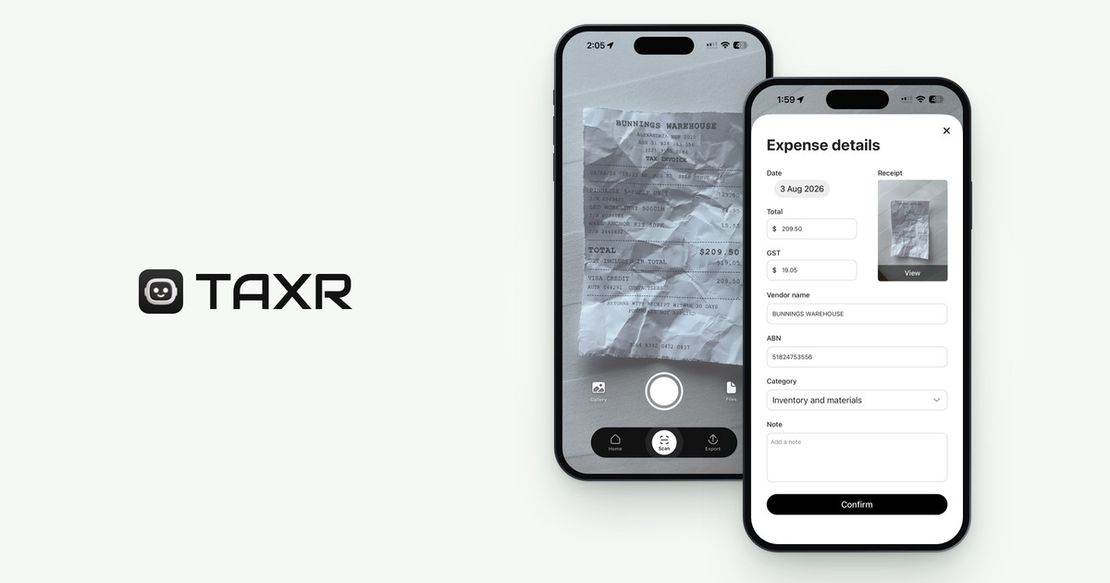
The best approach is to scan every receipt the moment you get it. For online purchases, save the confirmation email or invoice. For in-store purchases, snap a photo. A receipt scanning app keeps everything in one organised place, so you're not scrambling at the end of the financial year.
For more general tips on maximising your deductions, check out our guide on 5 tax deduction tips every freelancer should know. The 2026-27 Federal Budget announced several changes that affect creators earning income online, and the 2026 Budget guide for content creators covers what's relevant to your return.
Start Claiming What You're Entitled To
Content creation involves real costs (gear, software, internet, studio space, licensing, and marketing), and those costs deserve real deductions. Taxr keeps the record-keeping simple: scan your receipts with your phone, let the AI read the details and suggest an ATO-aligned category for you to confirm, and export an Excel or PDF report for your tax agent when it's time to lodge, without a spreadsheet or a shoebox of receipts. Download Taxr and start keeping more of what you earn.