Tax Deductions for Content Creators: A 1099 Guide
Table of Contents
In short: US content creators paid on a 1099 can deduct cameras, lighting and microphones, editing software, props bought only for content, and a home studio used regularly and exclusively for filming, streaming or editing. Gear a brand sends you for free is taxable income at its fair market value, and everyday clothing doesn't become deductible just because it appears on screen.
Your ring light, a second camera body, the shotgun mic you bought after a viewer complained about audio, a backdrop, extra SD cards, and the editing software renewal that hit your card the same week five different brands sent you 1099-NEC forms you didn't know were coming. Creator income doesn't arrive with a payroll department sorting any of this out for you. Then there's the moment nobody warns new creators about: a brand ships you a $400 gimbal for a sponsored post, and you find out "free" gear is actually taxable income at its fair market value. If you're monetizing on YouTube, TikTok, Instagram, Twitch, or a podcast feed, you're running a 1099 business the moment brands, platforms, or fans start paying you, and the deductions you claim are what stand between a fair tax bill and an unnecessarily painful one.
Disclaimer: This article provides general information only and does not constitute tax advice. Consult a tax professional, such as a CPA or enrolled agent, about your circumstances.
Every brand, platform, or agency that pays you $2,000 or more in a year (for payments made from 2026; the threshold was $600 before that) is generally required to send you a Form 1099-NEC or a similar 1099 form, which means a busy creator can end up with a stack of these every January, all reporting income you're on the hook to track deductions against. The fundamentals of that process apply to any independent contractor; our 1099 expense tracking guide covers them in full. If you're a musician or performer who also streams gigs or posts music content, our tax deductions for musicians and artists guide covers instrument- and performance-specific write-offs this piece doesn't.
Deductions Content Creators Can Claim
Here's what typically qualifies as a deductible business expense once you're creating content as a 1099 earner, all of it reported on Schedule C. See our line-by-line Schedule C category breakdown for exactly where each one lands on your return.
- Cameras, lighting, and microphones. Camera bodies, lenses, ring lights, softboxes, and mics are core production equipment, deductible for talking-head videos, product reviews, or a full studio setup. Larger purchases may need to be depreciated rather than written off all at once, so flag big-ticket gear for your tax pro.
- Editing software. Premiere Pro, Final Cut, CapCut Pro, Photoshop, or Audition: whatever you pay to edit video, photos, or audio is a direct cost of producing finished content.
- Props and materials bought specifically for content. An item bought only to appear in a video or post (a skit prop, ingredients for a recipe video that never gets eaten, materials for a craft tutorial) is deductible because it exists solely for the content, not your life outside it.
- Your home studio share. If you use part of your home regularly and exclusively for filming, streaming, or editing, you can deduct a share of your housing costs through the home office deduction. The simplified method deducts $5 per square foot of that space, up to 300 square feet, for a maximum of $1,500 a year, with no need to track actual home expenses.
- Platform and payment processing fees. Cuts taken by YouTube, Twitch, Patreon, or OnlyFans, and fees charged by PayPal or Stripe, come out before the money reaches you. If the income you report is the gross amount before those cuts, the fees are a deductible business cost.
- Contractors. Paying an editor, thumbnail designer, or virtual assistant to help produce your content is deductible. Flip side: if you pay any one contractor $2,000 or more over the year (for payments made from 2026; the threshold was $600 before that), you're responsible for issuing them a 1099-NEC, the same form the brands you work with send you.
- Courses and training in your niche. A course that sharpens skills you already use in your current content, such as color grading, podcast editing, or growing a TikTok audience, is deductible. Training for a completely unrelated new career isn't.
- Internet. The business-use share of your home internet bill is deductible, since uploading, streaming, and cloud backups all run through it.
- A dedicated business phone line. If you run a separate number for brand outreach or fan communication, that line is a straightforward business expense.
- Cloud storage for footage and raw files. Backblaze, Dropbox, Google One, and similar subscriptions that store raw footage, project files, and deliverables are deductible as a cost of protecting your work.
The Personal vs. Business Line for Lifestyle Creators
This is where lifestyle and vlogging creators run into trouble, and it's worth being direct: buying something doesn't become a business expense just because it appeared on camera once. A couch or backdrop that's also the actual furniture in your living room, an outfit you wore in one video but also wear as regular clothing, a phone you film with but also use to text friends and browse: these are mixed-use purchases, and only the business-use portion is deductible, if any. The test isn't whether an item showed up on screen; it's how it's actually used. Film 10% of your time in an outfit and wear it everywhere else, and you don't get to deduct the outfit. Creators who write off their whole wardrobe, living room furniture, or personal phone because it's technically visible in their content are exactly the profile that draws scrutiny.
What Doesn't Qualify
A few more categories are worth ruling out. Personal streaming subscriptions (Netflix, Hulu, Spotify) aren't deductible just because you occasionally reference or react to what's on them; that's personal entertainment with a thin content excuse attached. Personal grooming and gym memberships are generally personal too, even for on-camera creators. The bar for a genuine content nexus is narrow, and a regular haircut or gym routine doesn't clear it. And everyday clothing you'd wear regardless of filming doesn't become deductible just because it's on screen. It only qualifies as a costume or when it carries branding you wouldn't otherwise wear, like a sponsor's logo.
Record-Keeping
Creator income is scattered by nature: a small affiliate payout here, a brand deal there, a free skincare set from a PR mailer with no invoice attached, all arriving across email, Instagram DMs, and physical mail instead of one predictable paycheck. That's an easy trail to lose by tax time. Keep records for at least three years, the IRS's general rule, and longer if you've significantly underreported income in a given year. You don't need paper originals. The IRS accepts digital copies, including photos and scans, so a photo, screenshot or saved PDF made the moment a receipt lands in your hand or your inbox is enough.
Track Every Creator Expense with Taxr
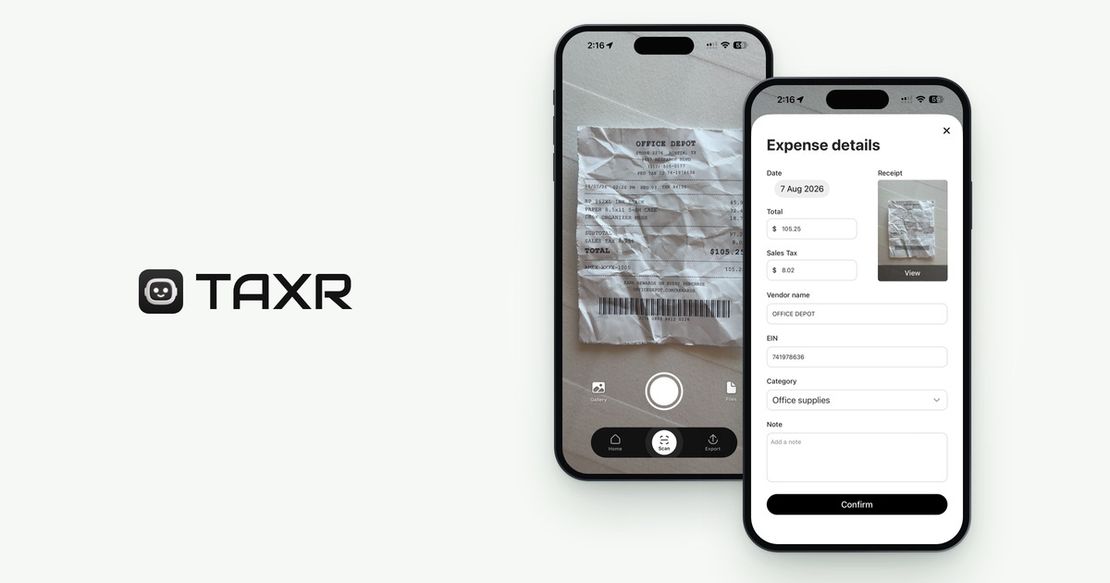
Between gear receipts, software renewals, and a dozen small brand-deal purchases, keeping a categorized record of everything you spend as a creator is a lot to manage by hand. Taxr is built for exactly this: scan a receipt with your phone camera (or import a screenshot or PDF), and the AI extracts the vendor, date, amount, and tax details, then suggests a Schedule C category, which you confirm. Everything is backed up, and at filing time you can export an Excel or PDF report to work from in your tax software or to send to your tax preparer.
Taxr doesn't file your taxes, isn't tax software, and doesn't calculate what you owe. It keeps every receipt you scan captured and organized, so nothing gets missed at tax time. For a broader look at automated capture, see our roundup of the best receipt scanner apps in 2026.
Your content is the product. Track the money behind it with the same care you put into the work, and tax season stops being something that just happens to you.