QuickBooks Self-Employed Is Closed to New Users: What to Use Instead in 2027
Table of Contents
In short: Intuit no longer accepts new QuickBooks Self-Employed signups and points new subscribers to QuickBooks Solopreneur. The best alternative depends on what you used QBSE for: full QuickBooks, Xero or Wave for full bookkeeping, Keeper for bank-linked deduction finding with tax filing, Everlance or Hurdlr for mileage, and Taxr (our own app) for turning receipts into Schedule C records.
If you've used QuickBooks Self-Employed for years and are only now realizing it's being wound down, you're not alone, and you're not imagining it. Intuit has closed QBSE to new customers and points new sign-ups to a replacement product. Here's what actually happened, what the replacement offers, and an honest breakdown of where to go instead depending on what you actually need.
Disclaimer: This article provides general information only and does not constitute tax advice. Consult a tax professional, such as a CPA or enrolled agent, about your circumstances.
What Happened to QuickBooks Self-Employed
QuickBooks Self-Employed was Intuit's stripped-down bookkeeping product built specifically for freelancers and gig workers: mileage tracking, expense categorization, and a simplified path to estimated quarterly taxes, all for a lower price than full QuickBooks. At its peak, it had more than 1 million subscribers, according to Intuit's own filings, making it one of the more widely used tools in this exact category.
That product is now being phased out. Intuit no longer accepts new QBSE signups: its own Google Play listing sends anyone starting a new subscription to QuickBooks Solopreneur. The QBSE iPhone app is no longer on the US App Store (it's still listed in some other countries, such as Canada and Australia). Existing subscribers can keep using QBSE, and Intuit still offers them its QBSE companion app on Android.
The Replacement: QuickBooks Solopreneur
Intuit's designated successor is QuickBooks Solopreneur: Intuit's own Google Play listing for QBSE sends anyone starting a new subscription there. Check Intuit's pricing page for the current plans and prices before you compare.
If you're a long-time QBSE user weighing a move to Solopreneur, compare its features and price with the parts of QBSE you actually use, rather than assuming "successor product" means "same tool, new name."
What QBSE Users Actually Lost
It helps to be specific about what QBSE was doing for people, because "bookkeeping app" covers a lot of different jobs, and QBSE happened to bundle several of them into one subscription:
- Automatic mileage tracking via phone GPS
- Receipt and expense capture, categorized toward Schedule C
- Quarterly estimated tax calculations, built from your tracked income and expenses
- A relatively low price point compared to full small-business accounting software
No single replacement does all four of those exactly the way QBSE did, which is why the right next step depends on which of those four you actually used, rather than looking for a like-for-like clone.
Honest Alternatives, by What You Actually Need
If you need full bookkeeping (invoicing, multiple clients, double-entry accounting, potentially payroll down the line): Look at full QuickBooks (the non-Solopreneur small business tiers), Xero, or Wave. These are built for businesses that have outgrown a simplified freelancer tool: more setup, more features, and generally more than a solo freelancer with straightforward 1099 income actually needs, but the right call if you're managing a growing business rather than just your own personal Schedule C.
If you want your bank transactions linked and someone else to actually file your taxes: Keeper (Standard at US$199 a year and Premium at US$399 a year, both with tax filing; Bookkeeping Only at US$20 a month without filing) links to your bank and card accounts, flags potential deductions automatically, and includes tax filing as part of the service. It's the closest match if what you valued in QBSE was the "connect your accounts and let software do the categorizing" workflow, plus you want the filing itself handled rather than just the bookkeeping. If Keeper itself doesn't fit, our guide to Keeper alternatives matches other options to each part of the job.
If mileage was the main thing you used QBSE for: Everlance (a free Basic plan with 30 automatically tracked trips a month; Starter at US$89.99 a year and Professional at US$119.99 a year) and Hurdlr are built mileage-first, with automatic GPS trip detection as the core feature rather than an add-on. If vehicle deductions are your largest category (rideshare and delivery drivers especially), a dedicated mileage app will generally out-track a general-purpose bookkeeping tool's mileage feature.
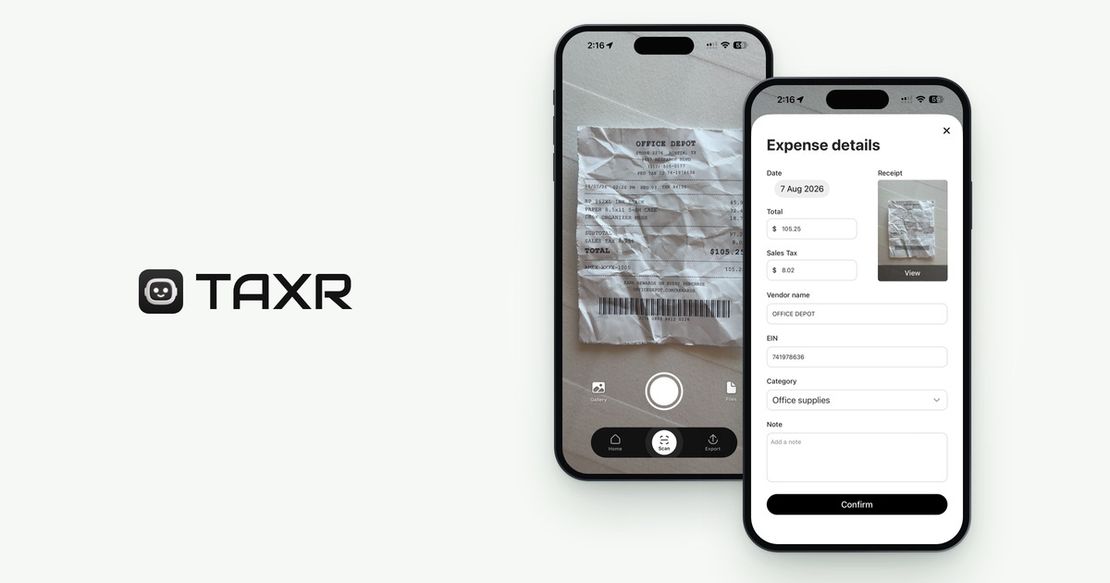
If what you actually need is turning receipts into clean Schedule C records: This is where Taxr (free to start, then from US$29.99 a year for Taxr Pro) fits. Taxr is built specifically for the receipts-to-Schedule-C job: scan a receipt, the AI reads the vendor, date, and amount, and it suggests a category that maps to your tax return for you to confirm. It doesn't do invoicing, doesn't do payroll, and doesn't file your taxes for you. It does one job well: turning a shoebox (or camera roll) of receipts into an organized record you can export as Excel or PDF for your accountant or to fill in your tax software.
If you're on a tight budget and don't mind some manual work: A spreadsheet plus a standalone receipt-scanning app is a genuinely workable budget stack. You lose the automatic categorization and reporting a dedicated tool provides, but you also pay close to nothing for it, and for a freelancer with a small, simple set of expenses, manual entry a few times a month is a reasonable tradeoff against a subscription.
Matching the Tool to the Job, Not the Name
It's tempting to assume the fix is finding "the new QBSE": one tool that replicates everything the old one did. In practice, QBSE bundled several distinct jobs into a single low-priced subscription. It's usually more useful, and often cheaper, to identify which one or two of those jobs actually mattered to you and pick a tool built specifically for that job, rather than paying for a general-purpose bundle where most of the features go unused.
If receipts and Schedule C categorization were the feature you actually opened the app for (not invoicing, not payroll, not full double-entry books), a tool built specifically for that job, rather than one that includes it as a smaller piece of a broader product, is usually the better fit going forward.
Don't Let the Transition Cost You Records
Whatever you land on, the most important thing during any software switch is not losing continuity in your records. Before you cancel QBSE or switch away from it, export whatever historical data you can (past categorized expenses, mileage logs, prior reports) so you're not starting from a blank slate. For guidance on what a complete expense record should look like going forward, see our 1099 expense tracking guide and our Schedule C expense category guide.
Where Taxr Fits
Taxr isn't trying to be everything QBSE was. It's built for one part of that job: turning receipts into organized, Schedule-C-ready records without the overhead of a full accounting platform. Scan a receipt, confirm the suggested category, and export a clean Excel or PDF report when you or your CPA need it. You can try it free with 10 scans. After that, Taxr Pro is US$2.99 a month or US$29.99 a year on the App Store (US$31.99 on Google Play). It's aimed squarely at freelancers whose main need is the receipts side of the job: not a replacement for invoicing software, and not a tax filing service. Download Taxr and see whether it's the right fit for the specific job you actually need done.