Keeper Alternatives for the 2027 Tax Season: 5 Options by Job
Table of Contents
The best Keeper alternative depends on which of Keeper's jobs you use. If you want an app that finds deductions and has a professional prepare your return, FlyFin is the closest match. If you'd rather file yourself, FreeTaxUSA charges US$0 for a federal return. If mileage is your biggest deduction, Everlance is built around it. And if what you need is receipts turned into Schedule C records without linking a bank account, that's what Taxr does.
Keeper (formerly Keeper Tax) bundles three jobs: finding write-offs in your bank and card transactions, keeping your books during the year, and filing your US return with a tax pro's review. Most people looking for an alternative need only one or two of those. Every price below comes from the product's own site on October 2, 2026.
Disclaimer: This article provides general information only and does not constitute tax advice. Consult a tax professional, such as a CPA or enrolled agent, about your circumstances.
What Keeper Does, and What It Costs
Keeper connects to your bank and card accounts, and its AI finds and categorizes expenses that look deductible. On the yearly plans it also prepares your federal and state returns, and a tax pro reviews and signs every return before it's e-filed. It's rated 4.8 on the US App Store.
These were the prices on Keeper's pricing page when we checked:
- Bookkeeping Only, US$20 a month. Expense tracking and deduction finding from connected accounts. Tax filing isn't included.
- Standard, US$199 a year. Bookkeeping plus a federal return and up to two state returns.
- Premium, US$399 a year. Adds returns for three or more states, rentals, K-1s and investments, quarterly tax payments, and meetings with a tax pro.
- Business, US$1,199 a year. For S-Corps and partnerships.
Every plan starts with a 14-day free trial.
The usual reasons to look elsewhere:
- You already have a CPA or enrolled agent. Keeper's yearly plans include a return you won't use.
- You don't want to link your bank. Keeper is built around connected accounts.
- You drive a lot. Keeper lists mileage tracking as "coming soon".
- Your records start as paper. Keeper can scan a receipt and match it to a transaction, but the bank feed is the starting point.
Our Taxr vs Keeper page compares the two directly.
Keeper Alternatives at a Glance
| Product | Best for | Price | Files your return | Needs bank access |
|---|---|---|---|---|
| Keeper | Deduction finding and a pro-reviewed return in one app | US$199 to US$399/yr with filing; US$20/mo bookkeeping only | Yes, on yearly plans | Built around linked accounts |
| FlyFin | AI deduction tracking with a CPA-prepared return | US$192/yr or US$348/yr (limited-time prices) | Yes | Built around linked accounts |
| FreeTaxUSA | Filing your own return at low cost | Federal US$0; state US$15.99 (2025 returns) | You prepare and e-file it yourself | No |
| Everlance | Mileage logs for people who drive for work | Free Basic plan; Starter US$89.99/yr; Professional US$119.99/yr | Listed as included on Professional | Only for automatic expense tracking |
| Taxr | Receipts turned into Schedule C records | Free to start; Pro US$2.99/mo or US$29.99/yr (US$31.99/yr on Google Play) | No | No |
| Spreadsheet | A few expenses a month | Free | No | No |
If You Want Deduction Finding and a Pro-Prepared Return: FlyFin
FlyFin is the closest like-for-like option. Its AI tracks deductions from the accounts you connect, and FlyFin says a CPA team prepares your federal and state returns for you to review and e-sign, then e-files them.
When we checked, FlyFin listed its Standard plan at US$192 a year and its Premium plan at US$348 a year, both marked as limited-time discounts. Both plans list CPA-prepared federal and state filing, audit insurance and unlimited CPA advice. Premium adds a designated CPA you can meet on Zoom, and it covers S-Corps and K-1s. FlyFin says the exact price is always shown in its app, so check there before you commit.
FlyFin costs about the same as Keeper, so it's an alternative in approach, not a saving. With Keeper, a tax pro reviews and signs your return. With FlyFin, the pitch is that CPAs prepare it. Both depend on linked accounts, so neither helps if bank access is what you want to avoid.
If You Want to File Yourself for Less: FreeTaxUSA
If you're comfortable preparing your own return, FreeTaxUSA is the low-cost route. Its pricing page says federal returns are US$0 "no matter your tax situation", and it lists self-employed features for freelancers and contractors as included. A state return is US$15.99. Those are the prices for 2025 returns, the current product when we checked. Optional Pro Support, at US$64.99, adds advice from a tax pro and a final review.
FreeTaxUSA is tax preparation software, not a year-round expense tracker, so you bring your own income and expense totals. Pair it with a record-keeping tool: track during the year, then enter the totals when you file. Our 1099 self-employment tax calculator estimates the self-employment tax to expect.
If Mileage Is Your Biggest Deduction: Everlance
If you drive for work, the mileage log may be the most valuable record you keep. Everlance is built for that job.
The free Basic plan includes 30 automatically tracked trips a month and unlimited trips you log by hand. Starter is US$89.99 a year (or US$10.99 a month) for unlimited automatic tracking and IRS-compliant reports. Professional is US$119.99 a year (or US$19.99 a month) and adds automatic expense tracking, tax filing and audit defense. Receipt photo capture is on every plan, bank and card integration is on Professional only, and there's a 7-day free trial.
Everlance Professional lists tax filing as included and costs less than Keeper's US$199 Standard plan. Check exactly what the filing covers before you rely on it. Keeper doesn't track mileage yet and Taxr doesn't either, so a mileage app does a job the others can't. Our IRS mileage rate guide explains what a compliant log needs. For when to use Everlance, Taxr or both, see Taxr vs Everlance.
If You Need Receipts Turned Into Records: Taxr
Taxr is our app, so weigh this section accordingly. It is not a like-for-like Keeper replacement. It doesn't connect to your bank, track mileage or file your return. It replaces the record-keeping half of the job.
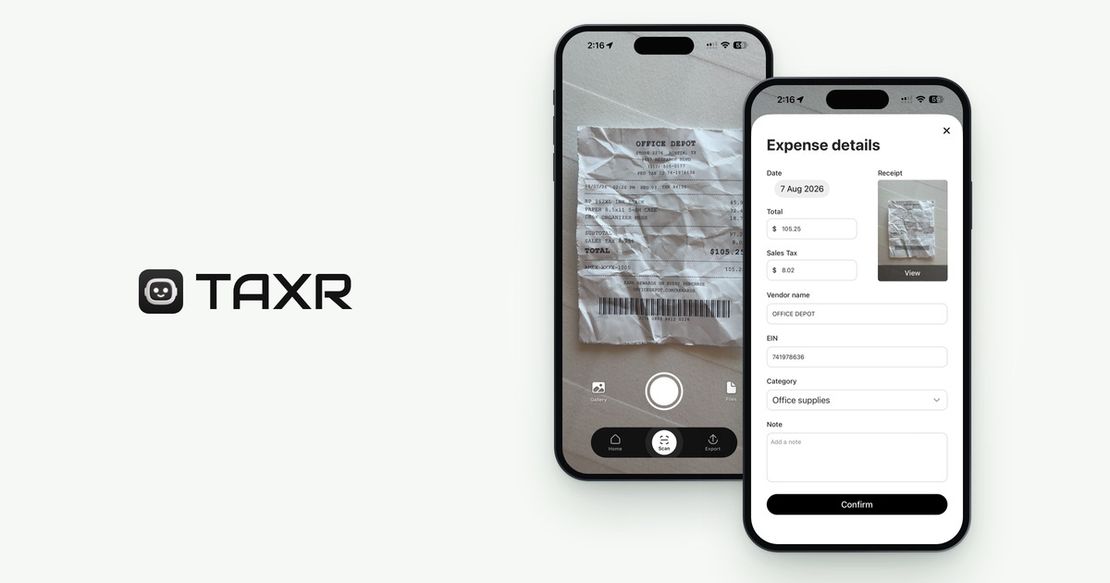
You photograph a paper receipt, pick a photo from your gallery or import a PDF. In about 5 seconds, AI reads the vendor, date, total and tax, and suggests a Schedule C-aligned category for you to confirm. The receipt image stays with the record in the app. At tax time you export an Excel or PDF report for any date range, emailed to you or your tax pro.
This matters because the IRS says supporting documents for an expense should identify the payee, the amount paid, proof of payment, the date, and a description of the item or service. A card statement shows who you paid, how much and when. The description is usually on the receipt. Our guide to what receipts the IRS requires goes through it.
Taxr is free to start. Taxr Pro, for unlimited scans, is US$2.99 a month or US$29.99 a year on the App Store (US$31.99 a year on Google Play). It runs on iPhone, iPad and Android and is localized for 195+ countries. You still need something to file with: tax software such as FreeTaxUSA, or your own tax pro.
If Your Expenses Are Few: A Spreadsheet and Your Own Tax Pro
The IRS doesn't require any particular system. Its recordkeeping guidance says you may choose any recordkeeping system suited to your business that clearly shows your income and expenses.
With a handful of expenses a month, a spreadsheet with a row per expense and a folder of receipt photos does the job for free. The cost is time: nothing gets captured unless you type it in. If you work with a tax pro, what to give your accountant lists what they'll ask for.
If you came to Keeper after QuickBooks Self-Employed closed to new users, see our QuickBooks Self-Employed alternatives post.
How to Choose
Start from the job you need done:
- You want one app to find deductions and file, and linking accounts is fine. Keeper is a reasonable choice. Compare FlyFin if you'd rather have a CPA team prepare the return.
- You already pay a tax pro. Skip the filing bundle. Keep clean records with a receipt scanner or a spreadsheet, and hand over the export.
- You'll file yourself. FreeTaxUSA for the return, plus records from wherever you keep them.
- You drive for work. Everlance for the mileage log, plus a receipt tool for everything else.
- You won't link a bank account. FreeTaxUSA, Taxr and a spreadsheet all work without a bank connection. So does Everlance's mileage tracking.
Frequently Asked Questions
Is there a free alternative to Keeper?
Partly. No free app covers everything Keeper does, but each job has a free or low-cost option. A federal return on FreeTaxUSA is US$0 (state returns were US$15.99 when we checked), Everlance's Basic plan tracks 30 automatic trips a month, and Taxr's first 10 scans are free. A spreadsheet costs only your time.
What is the closest alternative to Keeper?
FlyFin is the closest. It also uses AI to track deductions from connected accounts, and FlyFin says its CPA team prepares and e-files your federal and state returns. Its listed prices (US$192 or US$348 a year when we checked) are close to Keeper's US$199 and US$399.
Can I track deductions without linking my bank account?
Yes. The IRS doesn't require any particular record-keeping system, only records that clearly show your income and expenses. A receipt scanner such as Taxr, or a spreadsheet, builds those records from the receipts themselves with no bank connection. The trade-off is that nothing is captured unless you scan it or enter it.
Does Taxr replace Keeper?
No, not fully. Taxr replaces the record-keeping half: it scans receipts, suggests Schedule C categories for you to confirm, and exports Excel or PDF reports. It doesn't connect to your bank, track mileage or file your return, so you still file with tax software or a tax pro.
How much does Keeper cost?
Keeper's yearly plans with tax filing cost US$199 (Standard), US$399 (Premium) or US$1,199 (Business, for S-Corps and partnerships). Bookkeeping Only is US$20 a month without filing. Every plan starts with a 14-day free trial. These were the prices on Keeper's site on October 2, 2026.
The Bottom Line
Keeper suits people who want deduction finding and a filed return in one subscription. If that bundle is more than you need, split the job: a filing option that fits (FlyFin, FreeTaxUSA or your own tax pro), a mileage log if you drive, and receipt records behind every number.
For the receipt records, download Taxr and start free.