How to Organize Receipts for Taxes: A Simple System for US Freelancers
Table of Contents
In short: Put business spending on one card, capture each receipt the day you get it, and sort it into a Schedule C category with the image kept on the record. Review weekly or monthly, then hand over category totals at tax time. The IRS expects each record to show who you paid, how much, when and what for, and generally says to keep records 3 years.
A shoebox, a kitchen drawer, a camera roll full of receipt photos: every receipt system fails the same way. It depends on a future you doing one big, boring job in April, when nobody remembers what a June hardware store receipt was for. The fix is a smaller job: deal with each receipt while it's in your hand. Here is that system for US freelancers and 1099 contractors.
Disclaimer: This article provides general information only and does not constitute tax advice. Consult a tax professional, such as a CPA or enrolled agent, about your circumstances.
What the IRS Expects a Record to Show
The IRS doesn't require a particular app. Its recordkeeping guidance says you may choose any recordkeeping system suited to your business that clearly shows your income and expenses. What it does spell out, on its page about what kind of records to keep, is that the documents behind an expense should identify the payee, the amount paid, proof of payment, the date incurred, and a description of the item or service that shows it was a business expense.
A receipt covers most of that, and a card statement adds proof of payment: the IRS notes that a combination of documents may be needed. The description is the part people skip, and a few words written at the time ("tile adhesive for the Main Street job") settle it. The same page suggests organizing documents by year and by type of income or expense. More detail is in what receipts the IRS requires.
Three Rules Before You Scan Anything
Rule one: keep business money separate. Put business purchases on one card or account, so there's no personal spending to sort out. The IRS notes that for most small businesses, the business checking account is the main source for entries in the books.
Rule two: capture at purchase. A receipt is easiest to deal with the minute you get it, while you still know what it was for.
Rule three: sort by tax category, not by feel. "Misc" means nothing on a tax return and turns into questions from your tax pro. The categories that count are the expense lines on Schedule C.
Sort Every Receipt by Schedule C Category
Sole proprietors report business income and expenses on Schedule C (Form 1040). Part II of the current form lists the expense lines, from advertising on line 8 to other expenses on line 27b, with car and truck expenses, contract labor, office expense, supplies, travel and deductible meals in between. Our Schedule C categories guide explains each one. Two need care:
- Home office. The form says to enter expenses for business use of your home only on line 30, worked out separately: see the simplified vs actual home office deduction.
- Other expenses. Line 27b isn't a catch-all. Part V of the form asks you to list the business expenses that don't fit lines 8 to 27a.
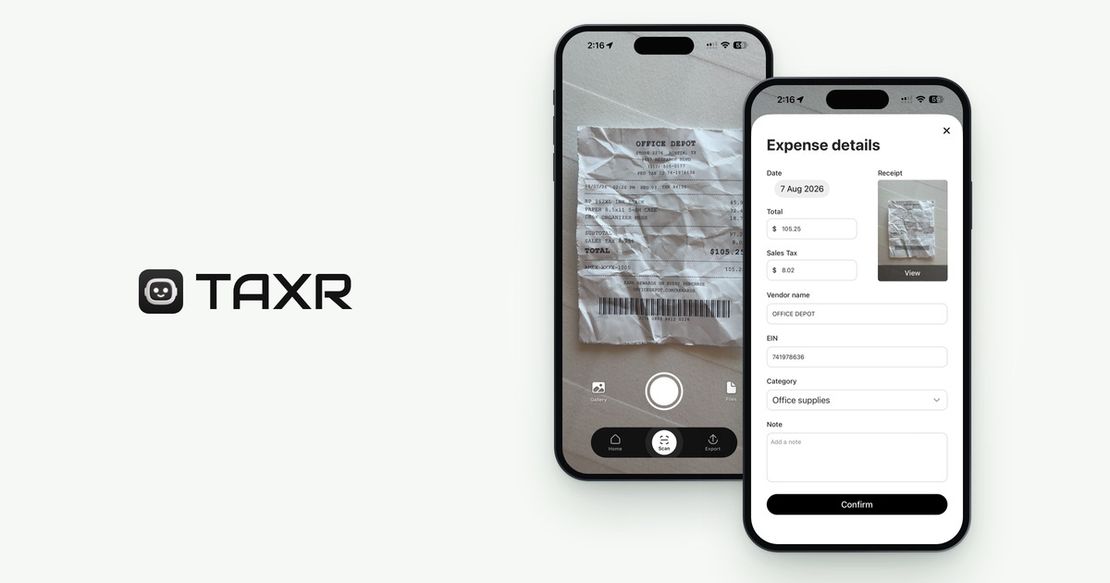
Taxr sorts as you scan: the AI reads the vendor, date, total and tax and suggests a Schedule C-aligned category, which you confirm or change before the record saves.
Keep the Receipt Image With the Record
A photo of a receipt can be your record. The IRS says all requirements that apply to hard copy books and records also apply to electronic records, and Publication 583 says an electronic storage system must be able to index, store, preserve, retrieve and reproduce records in legible format. In plain terms, the image must be readable and you must be able to find it.
In Taxr, the image stays with each record in the app, and you can search by vendor and filter by date range and category. The confirm screen also has a note field for the business purpose, which carries into your exports.
Handle Paper, Email and PDF Receipts
- Paper. Photograph it the day you get it, before it fades or gets lost. In Taxr a scan takes about 5 seconds.
- Email. Taxr doesn't take receipts by email. Save a PDF receipt to Files and import it, or import a screenshot from your photo gallery.
- PDF invoices. Import subscription, hosting and contractor invoices from Files, and Taxr reads them like a photo.
If you keep the paper too, one envelope per year is enough.
A Weekly or Monthly Routine
Capture handles most receipts, and a short review catches the rest. Once a week, or once a month if you buy less often, open your business card or bank statement and:
- Match each business charge to a record, and list anything without one.
- Find the missing receipts: search your email, download the invoice from the vendor's website, or ask for a copy.
- Check any category you weren't sure about, and add a note wherever the purpose isn't obvious.
If you drive for work, update your mileage log too. Taxr doesn't track mileage, and our IRS mileage rate guide explains what a log needs.
What to Hand a Tax Pro or Enter in Tax Software
Whoever prepares your return needs expense totals that match Schedule C lines, with a receipt behind each one. A tax pro will usually also want your 1099 forms, last year's return and your estimated payments: see what to give your accountant.
In Taxr, pick a date range (all time, the tax year, a quarter, a month or custom dates), choose Excel or PDF, and the report is emailed to you or your accountant. The PDF is a summary by category plus a table of every receipt. The Excel file has the same, plus a View link to each receipt image. The links expire 48 hours after the export, and the images stay in the app.
If you file yourself, enter the category totals in your tax software's Schedule C section. Taxr doesn't file returns or connect to tax software. For the full timeline, see how to prepare for US tax season.
How Long to Keep Records
The IRS page on how long to keep records gives these periods:
- 3 years after you file, in most cases. A return filed early counts as filed on the due date.
- 6 years if you leave out income that's more than 25% of the gross income shown on your return.
- 7 years if you claim a loss from worthless securities or a bad debt deduction.
- Indefinitely if you don't file, or file a fraudulent return.
- Records for property you depreciate, such as a laptop or camera, until the period of limitations expires for the year you dispose of it.
Keep copies of your filed returns too.
Frequently Asked Questions
Does the IRS accept photos of receipts?
Yes, if they're legible and you can retrieve them. The IRS applies the same requirements to electronic records as to paper ones, and Publication 583 says an electronic system must be able to reproduce records in legible format.
How long should I keep receipts for taxes?
At least 3 years after you file, in most cases. The IRS says 6 years if you leave out income that's more than 25% of the gross income on your return, 7 years for a worthless securities loss or bad debt deduction, and indefinitely if you don't file.
Is a bank statement enough without the receipt?
Usually not on its own. A statement shows who you paid, how much and when, and proves payment. The IRS also wants a description showing the purchase was a business expense, and says a combination of documents may be needed. The receipt or a note supplies that.
Can I organize receipts for taxes without an app?
Yes. The IRS says you may choose any recordkeeping system suited to your business that clearly shows your income and expenses. A folder of scans plus a spreadsheet with a Schedule C category column works. An app saves the typing.
Start With This Month's Receipts
Any system beats the shoebox, so start with the receipts in your wallet now. Taxr is free to start on iPhone, iPad and Android: scan a paper receipt, a gallery photo or a PDF, confirm the category, and the record is saved with its image. It doesn't file returns, track mileage or connect to your bank. More guides are in all US tax guides.
Download Taxr and capture this month's receipts today.