How Taxr Helps Accountants with Client Expense Reports
- Taxr Team
- Product updates
- Updated
Table of Contents
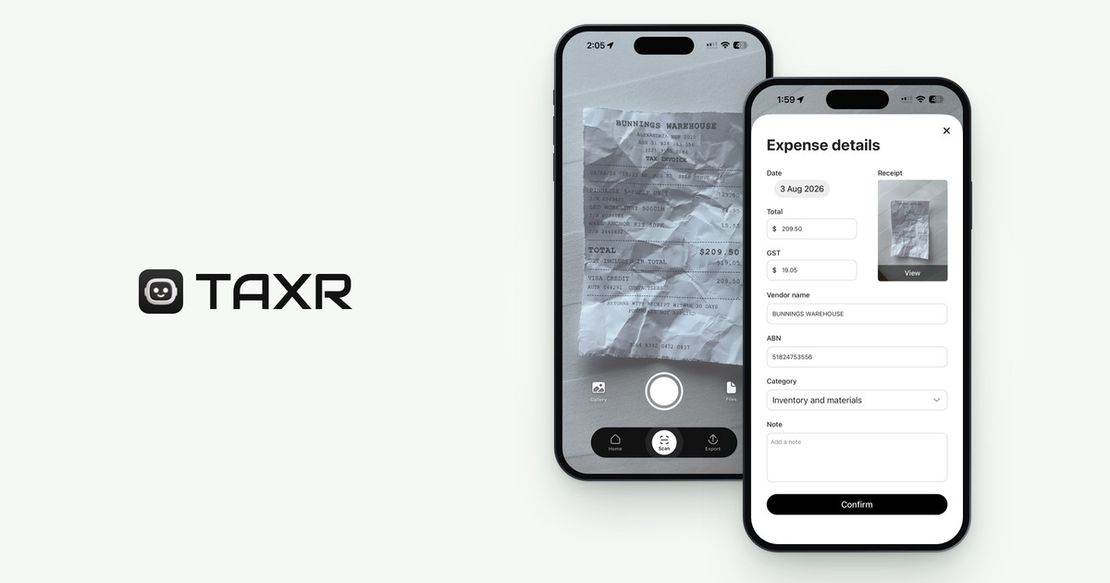
In short: With Taxr, clients scan each receipt in the mobile app when they get it, the AI reads the date, vendor, amount and GST and suggests a category the client confirms, and at tax time the client exports a categorised Excel or PDF report. Accountants review the figures instead of keying in receipts, and the free portal at portal.taxr.io shows linked clients' receipts with photos and categories.
Every accountant knows the drill. Tax time arrives and clients start handing over shoeboxes of crumpled receipts, half-organised spreadsheets, and vague explanations like "I think that one was for work." The hours spent chasing missing receipts, deciphering faded thermal paper, and manually entering expense data are hours that could be spent on higher-value advisory work. By recommending Taxr to their clients, accountants can eliminate the most tedious part of tax preparation and get cleaner, more complete data in return.
Disclaimer: This article provides general information only and does not constitute tax advice. Consult a registered tax agent for advice specific to your circumstances.
At its core, Taxr is a client-side tool: your clients scan and categorise receipts throughout the year, then export clean reports for you at tax time. This article explains how that workflow saves time at both ends, and what the free accountant portal adds on your side.
The Accountant's Receipt Problem
If you're an accountant working with sole traders, freelancers, or small business owners, you've encountered every variation of the receipt problem:
Chasing clients for receipts. You send a polite email in May asking for expense records. Then another in June. Then a phone call in July. Some clients respond immediately. Others need repeated reminders, and even then the records arrive incomplete.
Manual data entry. When receipts finally arrive (as photos in a text message, a zip file of PDFs, or an actual physical bag), someone on your team has to enter every transaction manually. Date, vendor, amount, GST, category. Line by line.
Unclear or missing categories. Clients rarely categorise their expenses correctly. A receipt from Officeworks could be stationery (office expenses), a desk lamp (home office), or a printer cartridge (equipment). Without context, you're guessing or asking follow-up questions that eat more time.
Missing receipts entirely. The ATO expects written evidence, such as a receipt or tax invoice, for the expenses clients claim, but clients routinely lose receipts. Reconstructing expenses from bank statements is possible but slow, and it doesn't give you the detail the ATO expects.
Every hour you spend on data entry and receipt chasing is an hour you're not spending on tax planning, advisory services, or simply getting through your client list faster during the busy season.
The Traditional Workflow vs. the Taxr Workflow
The contrast between the old approach and the Taxr approach is stark.
The Traditional Workflow
- Collect receipts. Wait for clients to deliver their records, typically months after the financial year ends. Follow up repeatedly.
- Enter data. Manually key in each receipt: date, vendor, amount, GST, description. This is the most time-consuming step.
- Categorise expenses. Assign each expense to the correct tax category. Requires knowledge of the client's business to do accurately.
- Reconcile. Cross-reference entered expenses against bank statements to catch missing items or duplicates.
- Prepare the return. Finally, use the organised data to complete the tax return or BAS.
Steps 1 to 3 are where the waiting, typing and sorting happen.
The Taxr Workflow
- Client scans receipts throughout the year. As purchases happen, the client takes a photo with Taxr. AI extracts the date, vendor, amount, and GST automatically.
- AI suggests the category. Taxr suggests a category for each expense from the tax categories for the client's country, and the client confirms it before the expense is saved.
- Accountant reviews the export. At tax time, the client exports their categorised expenses as an Excel or PDF report. The accountant reviews the data, adjusts any miscategorised items, and moves on.
- Prepare the return. With clean, categorised, and complete data, the accountant prepares the return without re-keying any receipts.
Nobody on your team types in receipts, so your time goes on reviewing the client's figures instead.
Where the Time Savings Come From
The time saved comes from eliminating specific bottlenecks:
No more data entry. Taxr's AI reads each receipt and extracts the key fields automatically. The client doesn't type anything, and neither does your team.
No more receipt chasing. When clients scan receipts as they go, the records are already complete by the time you need them. One export, one email, done. No more months of follow-up.
Better categorisation from the start. Taxr's AI suggests a category from the tax categories for the client's country, and the client confirms it at the time of purchase, while they still remember what it was for. A receipt from Bunnings could be tools and equipment for a tradie or home office supplies for a graphic designer, and the client is the one who knows which. Any that still need changing are quick to fix in a structured export rather than a pile of paper.
Fewer missing receipts. The act of scanning receipts immediately after purchase dramatically reduces the number of lost or forgotten receipts. Clients who use Taxr consistently arrive at tax time with near-complete records.
Reconciliation is faster. When expenses are already categorised and timestamped, comparing them against bank statements is quicker than working from a pile of paper.
How to Recommend Taxr to Your Clients
If you're considering recommending Taxr to your clients, here's what makes the conversation easy:
Simple onboarding. Taxr is a mobile app for iPhone, iPad and Android. Your client downloads it from the App Store or Google Play, creates an account, and starts scanning. There's no setup call, no training session, no desktop software to install.
Free tier available. Clients can start using Taxr for free with 10 receipt scans included. That's enough to experience the workflow before committing to Taxr Pro, which removes the "I don't want to pay for another app" objection.
No technical knowledge needed. If your client can take a photo with their phone, they can use Taxr. The AI reads the receipt and suggests the category, so the client doesn't need to understand accounting categories. They just confirm.
Year-round habit, not a year-end sprint. The key message for clients: scan your receipts when you get them. It takes about 5 seconds. If they do this consistently, you'll have clean data at tax time without a single follow-up email.
For detailed guidance on how clients should export their data before meeting with you, share our guide on how to export expenses for your accountant. If your clients employ staff, payday super applies from 1 July 2026. The payday super readiness checklist for accountants has the rollout playbook you'll need to walk them through it.
The Accountant Portal
The free accountant portal at portal.taxr.io is built for accountants who manage multiple clients:
Invite clients directly. Send an invitation by email from within the portal. When your clients accept, their receipts are linked to your account for easy access.
Review expenses before export. Browse your client's categorised expenses with the receipt photos, send the client a question about anything unclear, and adjust categories before the final export.
Adjust categories in bulk. Select multiple expenses and recategorise them at once. No more line-by-line corrections.
Export at tax time. Download a client's receipts as an Excel or PDF file for any date range.
Multi-client dashboard. See all your linked clients in one list, with their connection status and receipt counts, and send reminder emails in your practice's name from the same view. Replies come straight to you.
The portal is free for practices. Request access, then sign in with a link sent to your email, so there's no password to manage.
Better Data for Everyone
When clients scan as they go, the payoff for their accountant is less time on data entry, more complete records, and fewer back-and-forth emails during the busy season. Clients benefit too: they spend less time on expense admin and often discover deductions they would have missed with a manual process.
For practical tips on helping your clients organise their receipts before they meet with you, see our guide on organising receipts before seeing your accountant.
Partnership Opportunities
If you're an accountant who'd like to use the accountant portal, request access here. It's free for practices, and we set up each new practice by hand. If you'd like to explore partnership opportunities, contact us through the app or via our website.
The receipt problem isn't going away, but the solution is already here. Recommend Taxr to your clients and get the clean, categorised expense data you've always wanted at tax time.