GST Receipt Tracking: The Easiest Way to Stay BAS-Ready
- Taxr Team
- Expense management
- Updated
Table of Contents
In short: The easiest way to stay BAS-ready in Australia is to record GST as you go: scan each receipt with a GST receipt tracking app when you get it, so the GST amount is stored separately from the total. Keep a valid tax invoice to claim the GST credit on any purchase over $82.50 (including GST), and export your GST totals by category each quarter for your BAS.
If you're registered for GST in Australia, you already know the quarterly BAS cycle can be stressful. Every three months, you need to report your sales, purchases, and GST amounts, and if your records aren't organised, you're either scrambling to find receipts or leaving GST credits unclaimed. A GST receipt tracking app makes this much easier by capturing, categorising and recording your GST as you go, so when BAS time arrives, the hard work is already done.
Disclaimer: This article provides general information only and does not constitute tax advice. Consult a registered tax agent for advice specific to your circumstances.
Why GST Tracking Matters for Your BAS
When you lodge your Business Activity Statement, you report two key GST figures: the GST you've collected on sales (which you owe to the ATO) and the GST you've paid on business purchases (which the ATO owes you as credits). The difference determines whether you pay or receive a refund.
Accurate GST tracking directly affects your bottom line:
- Maximum credits: Every GST credit you miss is money you're giving away. If you spend $1,100 (including GST) on a business laptop, there's $100 in GST you can claim back. Miss that receipt, and you've just donated $100 to the ATO.
- Correct reporting: Under-reporting GST collected or over-claiming GST credits can trigger ATO penalties. The penalty for a false or misleading statement can range from 25% to 75% of the shortfall amount, depending on whether the error was careless or intentional.
- Cash flow clarity: Knowing your GST position throughout the quarter helps you set aside the right amount for your BAS payment and avoid cash flow surprises.
The ATO expects you to have a system for tracking GST on all your business transactions. Whether that system is a spreadsheet, accounting software or a dedicated app is up to you, but it needs to be accurate and consistent.
What Counts as a Valid Tax Invoice for GST Credits
To claim a GST credit on a purchase over $82.50 (including GST), you need a valid tax invoice from your supplier. The ATO has specific requirements for what a tax invoice must include, and they vary depending on the amount.
Purchases of $82.50 or less (including GST)
For small purchases you don't need a tax invoice to claim the GST credit. Keep a record of the purchase instead, such as the till receipt or docket, showing:
- The supplier's identity (name or ABN)
- The date of the purchase
- A brief description of what was sold
- The amount paid
Most till receipts from shops and cafes do this job for low-value purchases.
Tax invoices for purchases over $82.50 and under $1,000
For these purchases you need a tax invoice. It must show that it's intended to be a tax invoice, the supplier's identity and ABN, the date of issue, a description of what was sold (including quantity and price), and the GST amount (or a statement that the total includes GST).
Tax invoices of $1,000 or more
For purchases of $1,000 or more (including GST), the tax invoice must also include the buyer's identity or ABN. If a supplier provides an invoice for $1,000+ that doesn't include your details, ask them to reissue it. Without a compliant tax invoice, you technically can't claim the GST credit.
Common GST Tracking Mistakes That Cost You Money
These are the errors that trip up sole traders and small business owners most often:
Claiming GST on GST-free items
Not everything attracts GST. Common GST-free items include:
- Most basic food (fresh fruit, vegetables, bread, milk, meat)
- Some health services and medical aids
- Some educational courses
- Exports
If you claim a GST credit on a GST-free purchase, you've over-claimed, and if the ATO audits your BAS, you'll need to repay the amount plus potentially face a penalty. Always check whether the receipt shows a GST amount before claiming it.
Not verifying the supplier is GST-registered
You can only claim GST credits on purchases from suppliers who are registered for GST. If a supplier isn't registered, they shouldn't be charging GST, and there's no credit to claim. You can verify a supplier's GST registration on the ABN Lookup tool.
Mixing up GST-inclusive and GST-exclusive amounts
A $110 purchase with GST includes $10 of GST, not $110 of GST. It sounds obvious, but when you're entering figures manually (especially from receipts that only show the total), it's easy to record the wrong GST amount. When everything on a receipt is taxable, the GST component of the GST-inclusive price is the total divided by 11.
For example:
- Purchase total: $330 (GST-inclusive)
- GST component: $330 / 11 = $30
- GST-exclusive amount: $330 - $30 = $300
Missing the BAS deadline
BAS lodgement deadlines are firm. For quarterly lodgers, the BAS is due 28 days after the end of each quarter (or 28 February for the December quarter). Late lodgement attracts a failure-to-lodge penalty of one penalty unit ($364 from 1 July 2026, up from $330) for each 28-day period the BAS is late, up to a maximum of five penalty units.
Staying on top of your GST tracking throughout the quarter is the best way to avoid last-minute rushes and missed deadlines.
How AI Receipt Scanning Automates GST Extraction
Manual GST tracking, whether in a spreadsheet or by hand, is where most errors creep in. You mistype a number, forget to separate the GST, or skip a receipt because the thermal print is fading. AI receipt scanning solves these problems.
Here's how it works with a GST receipt tracking app like Taxr:
- Snap a photo of the receipt using your phone camera
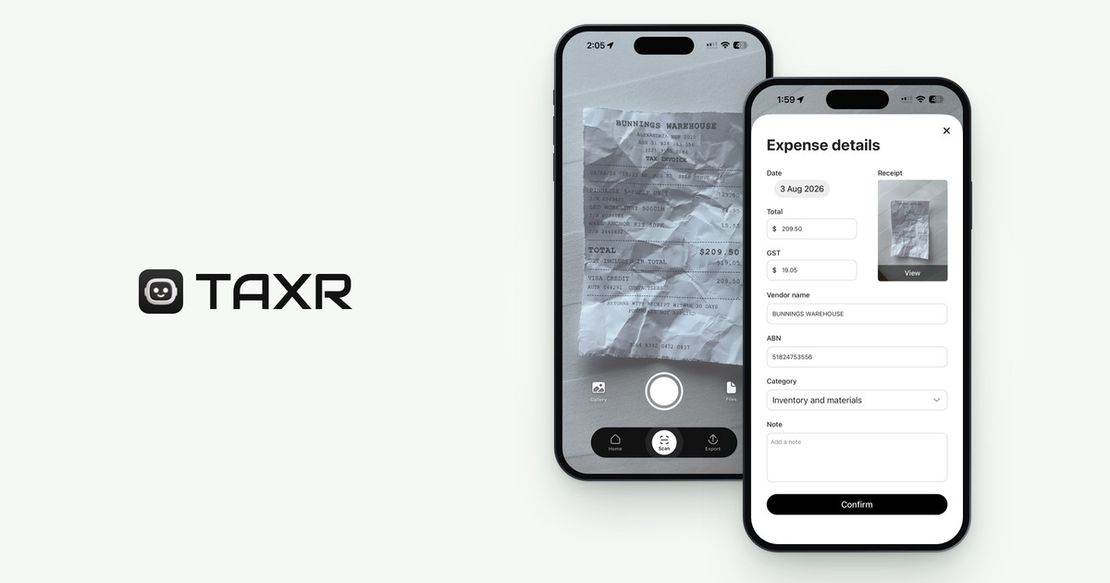
- AI reads the receipt and extracts the key data: date, vendor name, total amount and, critically, the GST amount as a separate figure
- GST-inclusive totals: the AI reads the final, GST-inclusive total and the GST amount shown on the receipt; if the GST isn't shown, that field is left blank for you to check
- Gaps you can see: if the GST amount or the supplier's ABN isn't on the receipt, those fields come back blank on the confirm screen, so you can follow up with the supplier before the information is lost
This eliminates the two biggest sources of GST tracking errors: manual data entry mistakes and missing information you don't notice until BAS time.
The AI reads thermal register receipts, printed invoices and PDF invoices (save an emailed PDF to Files and import it), and often handwritten receipts too. As long as the information is clearly visible, it can usually be extracted.
From Receipt to BAS Report in Three Steps
The entire GST tracking workflow can be reduced to three actions:
Step 1: Scan receipts with Taxr
Every time you make a business purchase, open Taxr and scan the receipt. It takes about 5 seconds: the AI extracts the date, vendor, amount and GST for you to confirm. Do this at the point of purchase and you'll never lose another receipt.
Step 2: AI extracts and categorises with GST
Each scanned receipt gets a suggested category from ATO-aligned expense categories, which you confirm. The GST amount is extracted and stored separately from the total, so your GST credits are tracked from the moment of capture. If a receipt shows no GST, the GST field stays empty, so you don't accidentally claim credits you're not entitled to.
Step 3: Export quarterly report with GST totals
At the end of each quarter, export an Excel or PDF report grouped by expense category with GST totals. This gives you (or your BAS agent) a clear summary:
- Total purchases by category
- GST paid on each category
- Overall GST credits to claim
Hand this to your accountant or BAS agent and the purchases side of your BAS is done; your sales figures come from your invoicing records. No more digging through drawers, no more re-checking spreadsheet formulas, no more guessing.
For a step-by-step guide to setting up your expense tracking system, see our post on how to track business expenses as a sole trader. And if you're looking for an alternative to the ATO's myDeductions tool, check out our best ATO myDeductions alternatives for 2026.
Get Started with Taxr
Taxr is built by a small team in Australia, and for Australian users it's set up for GST: it reads Australian tax invoices and GST-inclusive pricing, and suggests ATO-aligned expense categories. GST is extracted automatically on every scan, and your quarterly export totals the GST you paid by category, ready for the GST credits on your BAS.
You scan, confirm the details and export: no spreadsheet formulas and no retyping.
Stay BAS-Ready All Year Round
GST tracking doesn't have to be a quarterly crisis. With the right GST receipt tracking app, it becomes a habit of a few seconds after each purchase instead of a weekend-long ordeal four times a year. Build the habit and get those hours back. Download Taxr and make your next BAS the easiest one yet.