The Complete Guide to Scanning and Storing Receipts for Tax Compliance
Table of Contents
In short: The ATO accepts a clear, legible photo or scan of a receipt, so you don't need to keep the paper. Store the digital copies securely with a backup and keep them for five years from the date you lodge your tax return. Scan each receipt as soon as you get it, flat and in good light, and check that the date, amount and vendor are readable.
If you're claiming a tax deduction, you need the receipt to prove it. That's the fundamental rule, and it hasn't changed. What has changed is how you're allowed to store that proof. The ATO now fully accepts digital copies of receipts, which means you don't need to keep the physical paper, but the digital version needs to meet specific standards. This guide covers everything you need to know about scanning and storing receipts for tax compliance, from ATO requirements and what makes a valid receipt through to best practices for organising your digital records.
Disclaimer: This article provides general information only and does not constitute tax advice. Consult a registered tax agent for advice specific to your circumstances.
Getting this right protects you in the event of an ATO audit and ensures you never lose a legitimate deduction to a faded piece of thermal paper.
ATO Requirements for Receipt Storage
The ATO's rules on record keeping are detailed in their guidance on records you need to keep. Here are the key requirements:
Digital copies are accepted. You do not need to keep the original paper receipt if you have a legible digital copy. The ATO has accepted electronic records for years, and their guidance explicitly states that photos or scans of receipts are valid.
Records must be clear and legible. The digital copy must be readable. If you've ever tried to photograph a crumpled receipt in poor lighting and ended up with a blurry, unreadable image, you know this isn't always as simple as it sounds. The text, amounts, and dates must all be clearly visible.
Records must be stored securely. You need to protect your records from loss, damage, and unauthorised access. A single copy on your phone doesn't meet this standard: phones get lost, stolen and damaged. You need backup storage.
Records must be kept for five years. The clock starts from the date you lodge your tax return for the relevant income year, not from the date of the purchase. If you lodge your 2026-27 return in October 2027, you need to keep those records until October 2032. If you're claiming the instant asset write-off, thorough records are even more important now that the threshold has been made permanent, and the IAWO recordkeeping checklist covers exactly what the ATO expects you to retain.
Records must be in English or be readily convertible to English. If you have receipts in another language, you need a translation or a note explaining the expense.
What Makes a Valid Receipt
Not every piece of paper a vendor hands you qualifies as a receipt for tax purposes. A valid receipt must contain:
- The name or business name of the supplier: "ABC Office Supplies Pty Ltd", not just a generic terminal printout
- The date of the transaction: the date you made the purchase or the date the service was provided
- The amount paid: the total amount, clearly stated
- A description of the goods or services: "2x reams A4 paper, 1x ink cartridge" is adequate; "misc items" is not
- The GST amount: if the supplier is registered for GST, the receipt must show the GST component. This is essential for claiming input tax credits on your BAS
For purchases of $82.50 or less (GST inclusive), you don't need a tax invoice to claim the GST credit: a receipt or cash register docket is enough. For purchases over $82.50, you need a tax invoice from the supplier, and it only has to show your name or ABN as the buyer if the total is $1,000 or more.
What about email receipts? Digital receipts sent to your email are valid records. Save them in a dedicated folder or add them to your receipt app (Taxr can import a PDF from Files or a screenshot from your photos).
What about credit card statements? A credit card statement alone is not a receipt. It shows the amount and vendor but doesn't describe what was purchased or show the GST amount. It can support a claim alongside other records, but it shouldn't be your only proof.
Scanning Best Practices
The quality of your scan determines whether it's a valid record. A blurry, partially-cropped photo of a receipt is effectively no receipt at all. Follow these practices:
Use good lighting. Natural light or a well-lit room. Avoid shadows falling across the receipt, especially over the total or date.
Place the receipt on a flat surface. Lay it flat on a table or desk. This keeps the text in focus and prevents curling edges from obscuring information.
Capture the full receipt. Every line must be visible, from the vendor name at the top to the total and GST amount at the bottom. Better to include a bit of table around the edges than to crop too tightly.
Check the quality immediately. Zoom in and verify the date, amount, vendor name, and item descriptions are all readable. If anything is blurry, scan again while you still have the physical receipt.
Scan immediately. This is the single most important habit. Scan the receipt the moment you receive it: at the counter, in the car park, at your desk. Thermal paper receipts can become unreadable within weeks if exposed to heat or sunlight.
For a deeper look at how AI-powered scanning works and why it's more reliable than manual entry, see our article on how AI receipt scanning works.
Storage Options: From Bad to Best
Where you store your scanned receipts matters almost as much as the quality of the scan.
Phone gallery: not recommended. Receipt photos get mixed in with personal images, there's no metadata (vendor, amount, category), no reliable backup, and exporting 200 photos for your accountant is impractical.
Cloud storage (Google Drive, Dropbox, iCloud): better. You get backup and folder-based organisation, but it's all manual. You still need a separate spreadsheet to record amounts, GST, and categories. Your accountant wants a categorised expense report, not a folder of images.
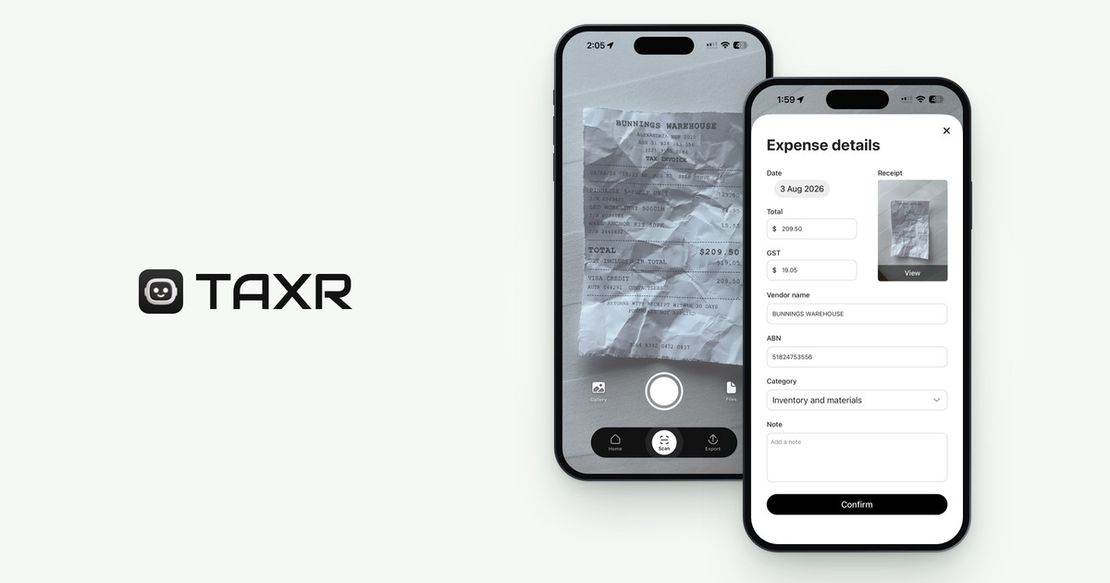
Dedicated receipt app: best. A purpose-built app like Taxr combines scanning, AI data extraction, category suggestions, secure cloud backup and clean exports in one tool. Scan a receipt and the date, amount, vendor and GST are captured automatically, with a suggested category for you to confirm. Generate a categorised Excel or PDF report with a few taps, complete with category totals, GST amounts and the date range you choose. Your records stay in the app for as long as your account is active, which covers the five-year ATO retention period.
Organising Your Scanned Receipts
However you store your receipts, organisation makes them useful. Without it, you just have a digital version of the shoebox. Three strategies work well:
- By date: group by month or quarter. Simple and effective for BAS preparation.
- By category: sort into ATO-aligned buckets like motor vehicle, home office, phone and internet, and office supplies. This is the most useful structure for tax return preparation. For a breakdown of what belongs in each category, see our guide on freelancer expense categories explained.
- By project or client: useful if you need to invoice clients for reimbursable expenses or track per-project profitability.
Most dedicated receipt apps, including Taxr, let you combine views without choosing just one structure: view by date, filter by category or search by vendor.
When to Scan: The Golden Rule
Scan the receipt immediately. Not tonight. Not this weekend. Not before the BAS is due. Immediately.
Every day you delay introduces risk:
- The receipt gets lost. Pockets, wallets, car seats, desk drawers: receipts migrate and disappear.
- Thermal paper fades. Many retail receipts are printed on thermal paper that degrades rapidly, especially in heat. A receipt left on your car dashboard can become blank within days.
- You forget the context. A $67 restaurant charge might be a deductible meal on an overnight business trip, or a personal dinner with friends (entertaining clients is generally not deductible in Australia). In three months, you won't remember which.
The five-second habit of scanning a receipt the moment you receive it is the single most impactful change you can make for your financial record keeping.
What to Do About Lost Receipts
Despite your best efforts, some receipts will go missing. When that happens:
- Check your email. Many vendors send email receipts automatically, or you can request a duplicate after the fact.
- Check your bank statement. It won't replace a receipt, but it provides the date, amount, and vendor name as a starting point.
- For small expenses of $10 or less each (totalling $200 or less), the ATO may accept alternative evidence, such as a bank statement combined with a diary note explaining the business purpose. This is not a blank cheque; the ATO still expects reasonable effort to keep proper records.
- For larger expenses, contact the vendor and request a duplicate receipt or invoice.
- Statutory declarations can be used in limited circumstances but are a last resort, not a regular practice.
Build the Habit, Not Just the System
The best receipt storage system in the world fails if you don't use it consistently. With an app like Taxr, scanning a receipt takes about 5 seconds. Do it at the counter, in the car park, or at your desk, and you'll never lose a deduction to a faded receipt again.
For a comparison of digital versus paper receipt management approaches, see our article on digital receipt management vs. paper.