Best Receipt Scanner App for Taxes in 2026
- Taxr Team
- Expense management
- Updated
Table of Contents
In short: For freelancers, 1099 contractors and sole traders who need receipt records at tax time, the best fit is Taxr (our own app), which reads receipts, suggests a tax-aligned category and is free to start, then US$29.99 a year on the App Store. Keeper suits US filers who want bank-feed deduction finding and filing, Everlance suits people who drive for work, and Dext suits accounting practices.
Choosing the best receipt scanner app 2026 has to offer can feel overwhelming: there are dozens of options, and they all promise to simplify your expense tracking. But for freelancers, independent contractors, and sole traders who need accurate records for tax time, not every app is created equal. Some are built for large enterprises, others lack OCR entirely, and many charge $100+ a year for functionality you may never use. In this guide, we compare the top options and help you find the right fit.
(Transparency: Taxr is our app. We've kept the comparisons factual, with real 2026 pricing, and we say plainly where a competitor is the better choice.)
Disclaimer: This article provides general information only and does not constitute tax advice. Consult a qualified tax professional about your circumstances.
What Makes a Good Receipt Scanner App?
The criteria we used:
- Extraction accuracy: how reliably the app reads receipts, especially faded, crumpled, or thermal-paper ones. If the scan is wrong, everything downstream breaks.
- Speed: seconds, not minutes, from photo to structured data.
- Auto-categorization: does the app assign tax-aligned expense categories automatically, or do you sort everything by hand?
- Export options: CSV, Excel, PDF, or accounting-software sync. Your accountant will thank you.
- Pricing: is there a free tier, and are paid plans priced for one person or for a firm?
- Tax-specific features: Schedule C categories, GST/VAT extraction, fiscal-year awareness. Generic expense trackers skip these entirely.
Top Receipt Scanner Apps Compared
Here's a fair look at six of the most popular options in 2026. We compare SimplyWise, another receipt app, separately in Taxr vs SimplyWise.
Taxr
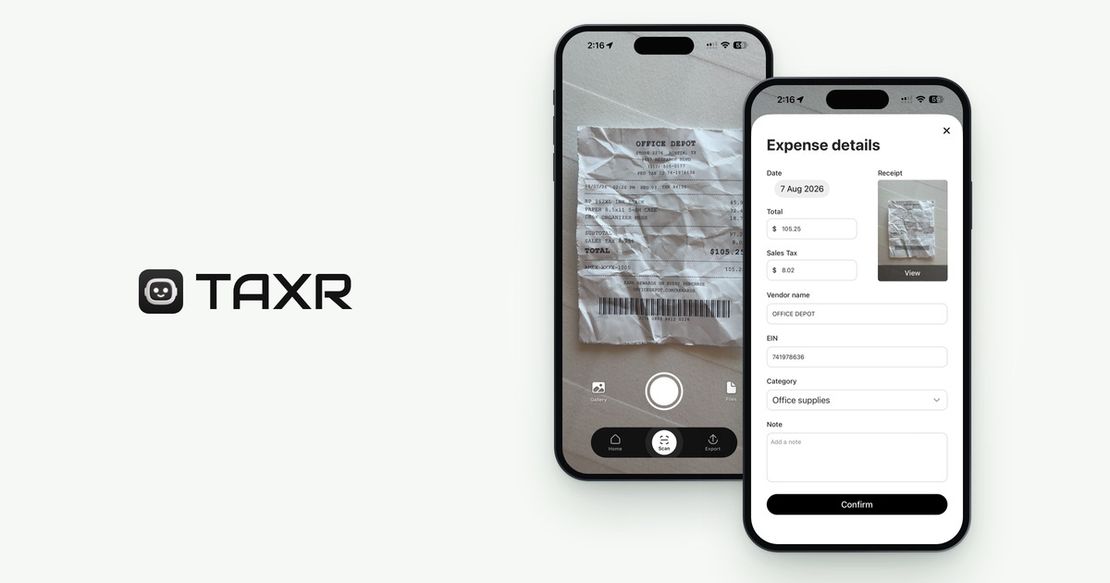
Taxr is an AI-powered receipt scanner built specifically for freelancers, contractors, and sole traders. Snap a photo, and the AI extracts the vendor name, date, total, tax, and vendor tax ID within seconds, then suggests a tax-aligned category for you to confirm. Everything is stored in the cloud with secure backup, and exports come in Excel and PDF formats structured for easy handoff to your accountant.
Taxr is localized for 195+ countries, with local currency, tax labels and financial-year settings (sales tax and Schedule C-aligned categories in the US, GST in Australia, VAT in the UK), and your country is pre-selected from your phone's region settings. Pricing is the standout: free for your first 10 scans, then US$2.99/month, or US$29.99/year on the App Store (US$31.99 on Google Play), for unlimited scans, with local prices in other countries. That's a fraction of every other paid app on this list.
Keeper
Keeper takes the opposite approach: instead of starting from receipts, it connects to your bank accounts and uses AI to flag transactions that look like write-offs, then files your US tax return in-app on its yearly plans (US$199/year Standard or US$399/year Premium; Bookkeeping Only is US$20/month without filing). Excellent if your spending is all on cards and you want filing bundled, though it's US-only. You can snap a receipt to add an expense or match it to a transaction, but the bank feed is the starting point: cash purchases and itemized detail only get in if you add them yourself. See Taxr vs Keeper for the full comparison. Our Keeper alternatives guide covers other options for each of Keeper's jobs.
Everlance
Everlance is first a mileage tracker (automatic GPS trip detection is its core), with expense tracking and receipt photo uploads on top (free Basic plan with 30 auto-tracked trips/month; Starter US$89.99/year or US$10.99/month; Professional US$119.99/year or US$19.99/month). If you drive for work (rideshare, delivery, sales), automatic mileage is a genuinely valuable feature receipt-first apps don't offer. It isn't a receipt scanner, though: its help center says the app "does not scan receipts or automatically import information from them into your transactions," so you enter each expense yourself (or, on Professional, it syncs from your card) and attach the photo.
Expensify
Expensify is one of the most established names in expense management, with SmartScan receipt OCR plus expense reports, approval workflows, corporate cards, and accounting integrations (free tier; paid from about $5/user/month). It's built for teams; for a solo freelancer the interface is heavier than the job requires. Full comparison: Taxr vs Expensify.
Dext (formerly Receipt Bank)
Dext is the accountant's tool: a document pipeline that extracts receipts, invoices, and bank statements into Xero, MYOB, or QuickBooks. Extraction quality is strong, but pricing is firm-grade: the only self-serve plan is $302.50/year (250 documents/month, 5 users), and practice plans run ~$17.70+ per client with a 10-client minimum. There's no individual tier. Great inside an accounting practice; expensive overkill for one person. Full breakdown: Taxr vs Dext and Dext pricing explained. For other options, see our Dext alternatives comparison.
ATO myDeductions
myDeductions is the free expense tool inside the ATO app for Australians. It lets you manually log expenses and attach photos, then upload into myTax at year end. The limitation is total manual entry: no OCR, no cloud sync, no accountant sharing, and data lives on a single device. See our best ATO myDeductions alternative comparison for detail.
Best Receipt Scanner App 2026: Feature Comparison
Extraction
- Taxr: High (AI-powered, handles faded and crumpled receipts well)
- Keeper: Not the focus (works from bank transactions; you can snap a receipt to add an expense or match it to a transaction)
- Everlance: None (stores receipt photos but doesn't read them)
- Expensify: Good (SmartScan is reliable for clean receipts)
- Dext: Good (strong extraction, especially invoices and statements)
- ATO myDeductions: None (manual entry only)
Tax-aligned auto-categorization
- Taxr: Yes, suggested for you to confirm (Schedule C-aligned in the US, ATO-aligned in AU, UK self-employment categories)
- Keeper: Yes (AI write-off detection on bank transactions, US)
- Everlance: Basic business categories
- Expensify: Generic business categories
- Dext: Via your accounting software's chart of accounts
- ATO myDeductions: Manual selection
Export formats
- Taxr: Excel, PDF
- Keeper: Files your US return in-app (yearly plans)
- Everlance: CSV on the free plan; CSV, Excel or PDF on paid plans
- Expensify: CSV, PDF, accounting integrations
- Dext: Sync to Xero, MYOB, QuickBooks
- ATO myDeductions: myTax upload only
Multi-country support
- Taxr: 195+ countries, localized tax labels, currency, fiscal years
- Keeper: US only
- Everlance: US-centric (IRS mileage rates)
- Expensify: Global, but no country-specific tax intelligence
- Dext: AU, UK, US and others, via accounting software
- ATO myDeductions: Australia only
Pricing (2026)
- Taxr: Free (10 scans) · US$2.99/mo · US$29.99/yr (App Store; US$31.99/yr on Google Play)
- Keeper: US$20/mo Bookkeeping Only · US$199/yr Standard or US$399/yr Premium with filing
- Everlance: Free tier (30 auto-tracked trips/mo) · Starter US$10.99/mo or US$89.99/yr · Professional US$19.99/mo or US$119.99/yr
- Expensify: Free tier · from ~$5/user/mo
- Dext: $302.50/yr (no free tier, no individual plan)
- ATO myDeductions: Free
Best for US Freelancers and 1099 Contractors
For US independent contractors, the job is keeping every deductible expense documented in Schedule C-aligned categories, and keeping the receipts themselves, since a bank line item isn't itemized documentation.
Taxr handles this out of the box: scan the receipt, the AI extracts it and suggests a category, and at tax time you export a categorized Excel or PDF report for your accountant or tax software. The Excel version links each expense to its receipt image (the links expire 48 hours after export), and the receipts themselves stay in the app. At US$29.99/year on the App Store it's roughly an eighth of Keeper's US$20-a-month Bookkeeping Only plan and a tenth of Dext.
Pick differently if: you want your return filed in the same app and your spending is all cards (Keeper), or you drive thousands of business miles and automatic mileage matters most (Everlance; note Taxr doesn't do mileage tracking).
Best for Australian Freelancers and Sole Traders
For Australians, the standout features are GST extraction, ATO-aligned categories and exports that total the GST you paid. Taxr handles all three: the AI separates the GST component automatically, categories match how the ATO groups work-related expenses, and exports total the GST you paid by category, ready for the GST credits on your BAS. Dext can serve Australians well, but usually via an accountant's practice subscription, not a $302.50/year individual purchase. myDeductions is free but all manual.
Best for UK Self-Employed
If you're self-employed in the UK, Making Tax Digital (MTD) record-keeping is the key consideration. Taxr tracks VAT and keeps digital records in UK self-employment categories. Note that it's a record-keeping tool, not MTD software: it can't send anything to HMRC, so you still need MTD-compatible software or an accountant to submit your updates. Dext is strong in the UK if your accountant already runs it.
Best Free Option
ATO myDeductions is completely free (Australia), but you pay in time: every receipt is typed by hand. Taxr's free tier gives you 10 AI-powered scans, suggested categories and cloud storage without paying a cent, which is the fastest way to find out whether AI extraction earns your trust. If you're processing more than a few receipts a week, OCR pays for itself quickly.
Frequently Asked Questions
What is the best receipt scanner app for 1099 taxes?
For documenting expenses with receipts, Taxr: it suggests Schedule C-aligned categories, keeps every receipt image in the app, and exports accountant-ready Excel or PDF reports for US$29.99/year (App Store). If you want in-app filing and bank-feed deduction detection instead of receipt records, Keeper (from US$199/year with filing) is the strongest US option.
What is the best free receipt scanner app?
Taxr's free tier includes 10 AI-powered scans, suggested tax-aligned categories and cloud storage. For Australians, the ATO's myDeductions app is free but fully manual: no OCR, no cloud sync.
Does the ATO accept digital copies of receipts?
Yes. The ATO accepts digital copies of receipts as valid tax records: you don't need the paper original once you have a clear digital copy that's a true reproduction and can be produced if needed. (The IRS and HMRC accept digital records on the same principle.)
What should a good receipt scanner app extract?
Vendor name, transaction date, total amount, and the tax component, automatically from a photo. More advanced apps like Taxr also extract the vendor tax ID, suggest the expense category, and handle edge cases like faded thermal paper and PDF invoices.
Which App Is Right for You?
If you're a freelancer, contractor, or sole trader who wants fast, accurate scanning with tax-aligned categories and a simple interface, at US$29.99/year instead of US$199 to US$399, Taxr is built exactly for that. It handles the tedious parts (reading receipts, suggesting categories, extracting the tax) so you can focus on your actual work. Download Taxr and try it free.