The Best ATO myDeductions Alternative for 2026
- Taxr Team
- Expense management
- Updated
Table of Contents
In short: For Australian freelancers and sole traders who have outgrown myDeductions in the ATO app, an AI receipt scanner such as Taxr is the better choice: it reads the date, amount, vendor and GST from each receipt, stores records in the cloud and exports Excel or PDF reports. myDeductions is free and feeds into myTax, but you type in every expense by hand and run backups yourself.
If you've been using the ATO app to log your work expenses, you've probably wondered whether there's a better ATO myDeductions alternative out there. The short answer: there is. The ATO's built-in tool was a solid first step toward digital record-keeping, but it hasn't kept pace with what freelancers and sole traders actually need in 2026. In this post, we'll break down where myDeductions falls short and what to look for in a smarter replacement.
Disclaimer: This article provides general information only and does not constitute tax advice. Consult a registered tax agent for advice specific to your circumstances.
What Is ATO myDeductions?
myDeductions is a feature inside the official ATO app. It lets you manually record expenses and income throughout the financial year, then upload those records at tax time to pre-fill parts of your return. You can log the date, amount, category, and attach a photo of a receipt.
For people with straightforward employment income and a handful of deductions, myDeductions does the basics. It's free, it's from the ATO itself, and it feeds directly into myTax. That simplicity is its main selling point, but it's also its biggest limitation.
When the ATO first rolled out myDeductions, it was pitched as a solution for employees who had maybe a dozen work-related expenses a year: some uniform laundry, a few stationery items, a union fee. For that narrow use case it still works. But the freelancer and sole trader market has grown considerably, and the tool was never redesigned to match.
Limitations of myDeductions
Once you start using myDeductions for anything beyond a few expenses a year, the cracks show quickly.
No OCR or smart scanning. Every expense must be typed in by hand. You can take a photo of a receipt, but the app doesn't read any of the information from it. You still have to enter the date, amount, vendor name, and category yourself. For freelancers who process dozens of receipts a month, that's a lot of tedious data entry.
Single device, no cloud sync. Your myDeductions data lives on the phone where you entered it, and the app doesn't back it up automatically: you have to run a backup yourself and restore it on a new phone. If you lose your device before backing up, or simply want to check your records from a laptop, you're out of luck. There's no web interface and no cross-device sync.
Basic accountant sharing. At tax time, you can upload your records to myTax or email your tax agent a CSV file, but the receipt photos aren't included (to send those, you have to create a backup file and send that). If you use a tax agent, you'll need to export, email, and hope the format works for their software.
Limited categorisation. myDeductions offers a basic set of categories, but they don't always align with how freelancers and sole traders actually need to report their expenses. There's no ability to create custom categories or map expenses to your own chart of accounts.
Limited export options. Apart from uploading to myTax, your only export is a raw CSV file by email. There are no PDF reports, no totals by category, and no integration with accounting software like Xero or MYOB.
Basic interface. The ATO app was designed to cover a lot of ground: super, tax returns, payment plans and more. myDeductions is just one small feature within that broader app, and the user experience reflects that. It's functional, but it's not built for people who need to manage expenses seriously.
No GST tracking for BAS. If you're GST-registered, myDeductions has no features that help you prepare a Business Activity Statement. There's no way to break down GST components, run quarterly reports, or separate capital purchases from regular expenses. Sole traders on quarterly BAS cycles need to reconstruct this information elsewhere anyway, which defeats the point of using the tool in the first place.
What to Look for in a Better ATO myDeductions Alternative
If you're outgrowing myDeductions, here are the features that actually matter for day-to-day expense tracking:
- OCR accuracy: the app should read receipts automatically and extract the date, amount, vendor, and GST without manual entry.
- Cloud backup: your data should be stored securely in the cloud, available when you sign in on another phone or tablet, and protected if you lose your phone.
- Multi-device access: you should be able to view and manage your expenses on your phone and your tablet.
- Easy exports: a good expense tracker lets you export reports to email so you always have your records on hand.
- Smart categorisation: AI that suggests a category for each receipt, so you only confirm or change it.
- Flexible exports: Excel or PDF, so your data fits into whatever workflow you or your accountant use.
Taxr vs myDeductions: Feature Comparison
Here's how Taxr stacks up against myDeductions across the features that matter most:
Receipt scanning
- myDeductions: Manual entry only. You can attach a photo, but no data is extracted from it.
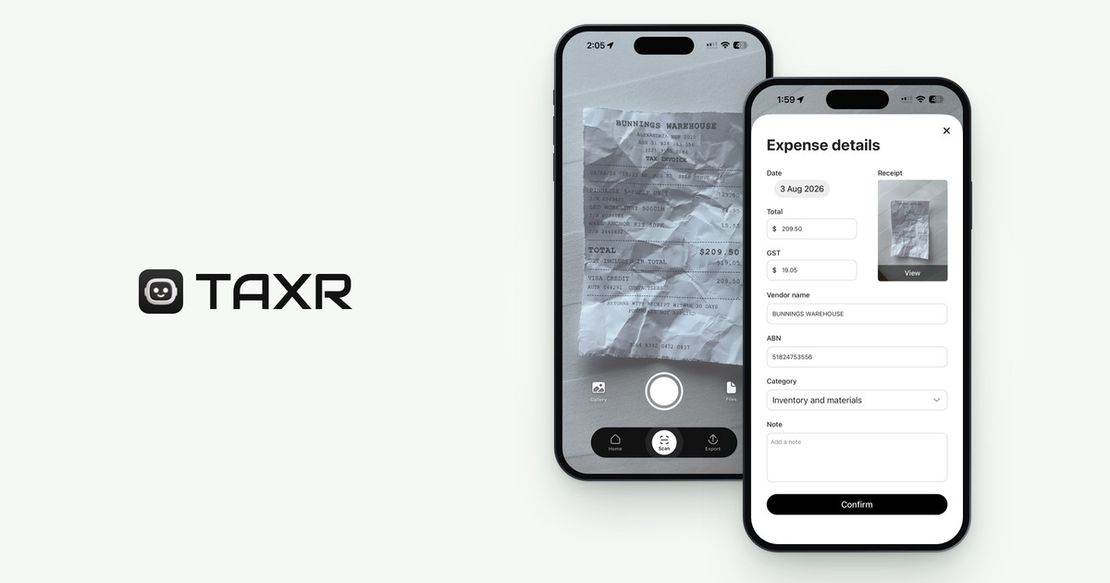
- Taxr: AI-powered OCR scans receipts in seconds, extracting date, amount, vendor, and GST automatically.
Cloud storage and sync
- myDeductions: Data stored on your phone. No automatic backup or cloud sync; you back it up yourself.
- Taxr: All receipts and data stored securely in the cloud. Sign in on any phone or tablet, and your records are safe even if you lose your phone.
Auto-categorisation
- myDeductions: Basic fixed categories. Manual selection for every expense.
- Taxr: AI suggests a category based on the receipt content. You can review and adjust with a tap.
Export formats
- myDeductions: Upload to myTax, or a raw CSV file by email.
- Taxr: Export to Excel or PDF. Clean, structured reports ready for your own records.
Multi-country support
- myDeductions: Australia only.
- Taxr: Supports 195+ countries with localised currency, tax labels, and fiscal year settings. Useful if you relocate, since you can change your country in Settings.
Export options
- myDeductions: Email a CSV (without receipt photos) or a backup file to your tax agent.
- Taxr: Email Excel or PDF expense reports to yourself or your accountant.
GST extraction
- myDeductions: You enter GST amounts manually.
- Taxr: Automatically detects and extracts GST from scanned receipts, making BAS preparation faster.
For a broader look at how different receipt scanning apps compare, see our best receipt scanner app for 2026 roundup. Our Taxr vs ATO myDeductions comparison sets the two apps side by side.
Why Freelancers and Sole Traders Are Switching
The most common frustrations we hear from people moving away from myDeductions are surprisingly consistent:
Lost data when switching phones. Because myDeductions stores everything locally, upgrading your phone or getting a replacement means starting from scratch unless you remembered to back up first. For freelancers who track expenses year-round, losing months of records is a real risk.
Tedious manual entry. When you're processing 20, 50, or 100+ receipts a month, typing in every single one by hand is a real productivity drain. OCR scanning saves hours over a financial year.
No easy export options. Most freelancers work with a tax agent, and the handoff at tax time should be simple. With myDeductions, it's anything but. Emailing a raw CSV without the receipt photos creates extra work for everyone involved.
Australia-only. If you do any work internationally, invoice clients overseas, or split your time between countries, myDeductions simply doesn't accommodate that. Taxr is localized for 195+ countries (the currency, tax label and categories follow the country you choose in Settings), so it moves with you if you relocate. Our international freelancer tax guide covers managing expenses across Australia, the UK and the US.
No smart features. In 2026, AI can read most crumpled petrol receipts, even in poor lighting, and fill in the fields for you to check. myDeductions still asks you to type it all in yourself. The gap between what's possible and what the ATO app offers has grown too wide to ignore.
A Year in the Life: Why the Small Friction Adds Up
Consider a sole trader tradie who processes around 15 receipts a week: fuel, hardware purchases, tools, site supplies, parking, a few client lunches. That's roughly 780 receipts per year. With myDeductions, each receipt is a manual entry: opening the app, tapping through the form, typing the amount, selecting a category, attaching a photo. Conservatively, two minutes per receipt is 26 hours of pure data entry every year.
For the same tradie using an OCR-powered scanner, the workflow is a single photo. The app reads the vendor, date, amount and GST in seconds and suggests a category, and you confirm it. A quick review at the end of each week takes maybe ten minutes. Across the year, that's the difference between 26 hours of admin and under 10. For many freelancers, that recovered time alone justifies moving off myDeductions.
The same friction appears at BAS time. Pulling a quarterly GST summary out of myDeductions means exporting, opening the file, and manually categorising everything before you can file a BAS, because myDeductions has no native GST reporting. A modern expense tracker that extracts GST at scan time already has the GST you paid on purchases totalled for your BAS.
Try Taxr Free
Taxr was built for freelancers and sole traders who want expense tracking that actually saves them time. With AI-powered receipt scanning, automatic GST extraction, category suggestions and clean Excel and PDF exports, it handles the receipt work myDeductions leaves to you. Your receipts are stored securely in the cloud, so a lost or replaced phone doesn't cost you your records. Download Taxr and see the difference for yourself.